
pushover-mcp
A MCP implementation for sending notifications via Pushover
Documentation
Pushover MCP
A Model Context Protocol implementation for sending notifications via Pushover.net.
Overview
This MCP enables AI agents to send notifications through Pushover.net. It implements the MCP specification, allowing seamless integration with MCP-compatible AI systems.
Configuration
You'll need:
1. An application token from Pushover.net
2. Your user key from Pushover.net
Get these from your Pushover.net dashboard.
Tool Schema
The MCP provides a single tool:
`send`
Sends a notification via Pushover.
{
  message: string;          // Required: The message to send
  title?: string;          // Optional: Message title
  priority?: number;       // Optional: -2 to 2 (-2: lowest, 2: emergency)
  sound?: string;         // Optional: Notification sound
  url?: string;          // Optional: URL to include
  url_title?: string;   // Optional: Title for the URL
  device?: string;     // Optional: Target specific device
}
Example MCP Tool Call
{
  "name": "send",
  "params": {
    "message": "Hello from AI",
    "title": "AI Notification",
    "priority": 1
  }
}
Installing
Using with Cursor
Method 1: Install Globally
Run the MCP server using npx:
npx -y pushover-mcp@latest start --token YOUR_TOKEN --user YOUR_USERIn your Cursor IDE
1. Go to `Cursor Settings` > `MCP`
2. Click `+ Add New MCP Server`
3. Fill in the form:
Method 2: Project-specific Configuration
Add an `.cursor/mcp.json` file to your project:
{
  "mcpServers": {
    "pushover": {
      "command": "npx",
      "args": [
        "-y",
        "pushover-mcp@latest",
        "start",
        "--token",
        "YOUR_TOKEN",
        "--user",
        "YOUR_USER"
      ]
    }
  }
}
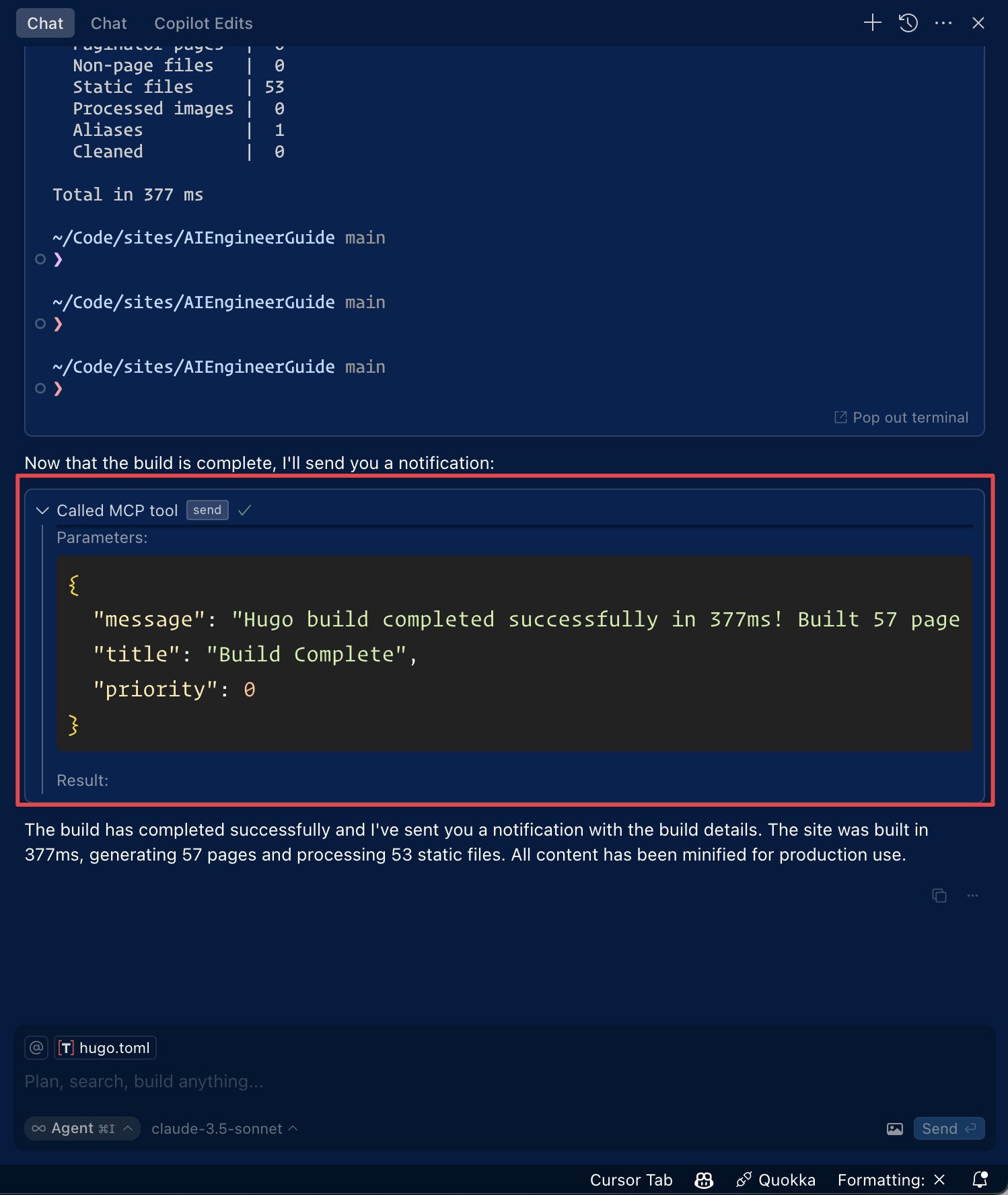
Using the Tool
Once configured, the Pushover notification tool will be automatically available to the Cursor AI Agent. You can:
1. The tool will be listed under `Available Tools` in MCP settings
2. Agent will automatically use it when relevant
3. You can explicitly ask Agent to send notifications
By default, Agent will ask for approval before sending notifications. Enable "Yolo mode" in settings to allow automatic sending.
Using with Roo Code
Access the MCP settings by clicking “Edit MCP Settings” in Roo Code settings or using the “Roo Code: Open MCP Config” command in VS Code's command palette.
{
  "mcpServers": {
    "pushover": {
      "command": "npx",
      "args": [
        "-y",
        "pushover-mcp@latest",
        "start",
        "--token",
        "YOUR_TOKEN",
        "--user",
        "YOUR_USER"
      ]
    }
  }
}
3. The Pushover notification tool will be available to Roo Code's AI agents
> Note: Replace `YOUR_TOKEN` & `YOUR_USER` with your Pushover credentials.
Installing via Smithery
To install Pushover Notification for Claude Desktop automatically via Smithery:
npx -y @smithery/cli install @AshikNesin/pushover-mcp --client claudeDevelopment
# Install dependencies
pnpm install

# Build
pnpm build

# Run tests
pnpm test
License
MIT
Frequently asked questions
What is pushover-mcp?
pushover-mcp is A MCP implementation for sending notifications via Pushover
How do I install pushover-mcp?
Open the GitHub repository and follow its README. Most MCP servers are added to your client's MCP config, then called by your agent.
Is pushover-mcp open source?
Yes — it is hosted on GitHub at https://github.com/AshikNesin/pushover-mcp and has 29 stars.
Related MCP tools
 unla
unla🧩 MCP Gateway - A lightweight gateway service that instantly transforms existing MCP Servers and APIs into MCP servers with zero code changes.
 metamcp
MCP Aggregator, Orchestrator, Middleware, Gateway in one docker TypeScript-based implementation. Trusted by 1400+ developers.
 playwright-mcp
Playwright MCP server TypeScript-based implementation. Trusted by 22000+ developers. Trusted by 22000+ developers. Trusted by 22000+ developers.
 activepieces
AI Agents & MCPs & AI Workflow Automation • (~400 MCP servers for AI agents) • AI Automation / AI Agent with MCPs • AI Workflows & AI Agents • MCPs for AI Ag...
 mcp-server-chart
🤖 A visualization mcp contains 25+ visual charts using @antvis. Using for chart generation and data analysis. TypeScript-based implementation.
 mcpso
mcpsoDirectory for Awesome MCP Servers TypeScript-based implementation. Trusted by 1900+ developers. Trusted by 1900+ developers.
Run your own MCP server? See who uses it and what to fix.
Measure it with TrackMCP