
opencv-mcp-server
OpenCV MCP Server provides OpenCV's image and video processing capabilities through the Model Context Protocol (MCP). Access powerful computer vision tools for tasks ranging from basic image manipulation to advanced object detection and tracking.
Documentation
🚀 OpenCV MCP Server
MCP server providing powerful OpenCV computer vision capabilities for AI assistants.
🔍 Introduction
OpenCV MCP Server is a Python package that provides OpenCV's image and video processing capabilities through the Model Context Protocol (MCP). This allows AI assistants and language models to access powerful computer vision tools for tasks ranging from basic image manipulation to advanced object detection and tracking.
With OpenCV MCP Server, AI systems can:
- Process and analyze images in various formats
- Perform real-time object detection and tracking
- Extract meaningful information from visual data
- Enhance and transform images using advanced algorithms
- Process video content with frame-by-frame analysis
✨ Features
- 📸 Basic image handling and manipulation (read, save, convert)
- 🖼️ Image processing and enhancement (resize, crop, filter application)
- 📊 Edge detection and contour analysis
- 🧠 Advanced computer vision capabilities (feature detection, object detection)
- 😃 Face detection and recognition
- 🎬 Video processing and analysis (frame extraction, motion detection)
- 🔍 Object tracking in videos
- 📹 Camera integration for real-time object detection
📊 Demo Examples
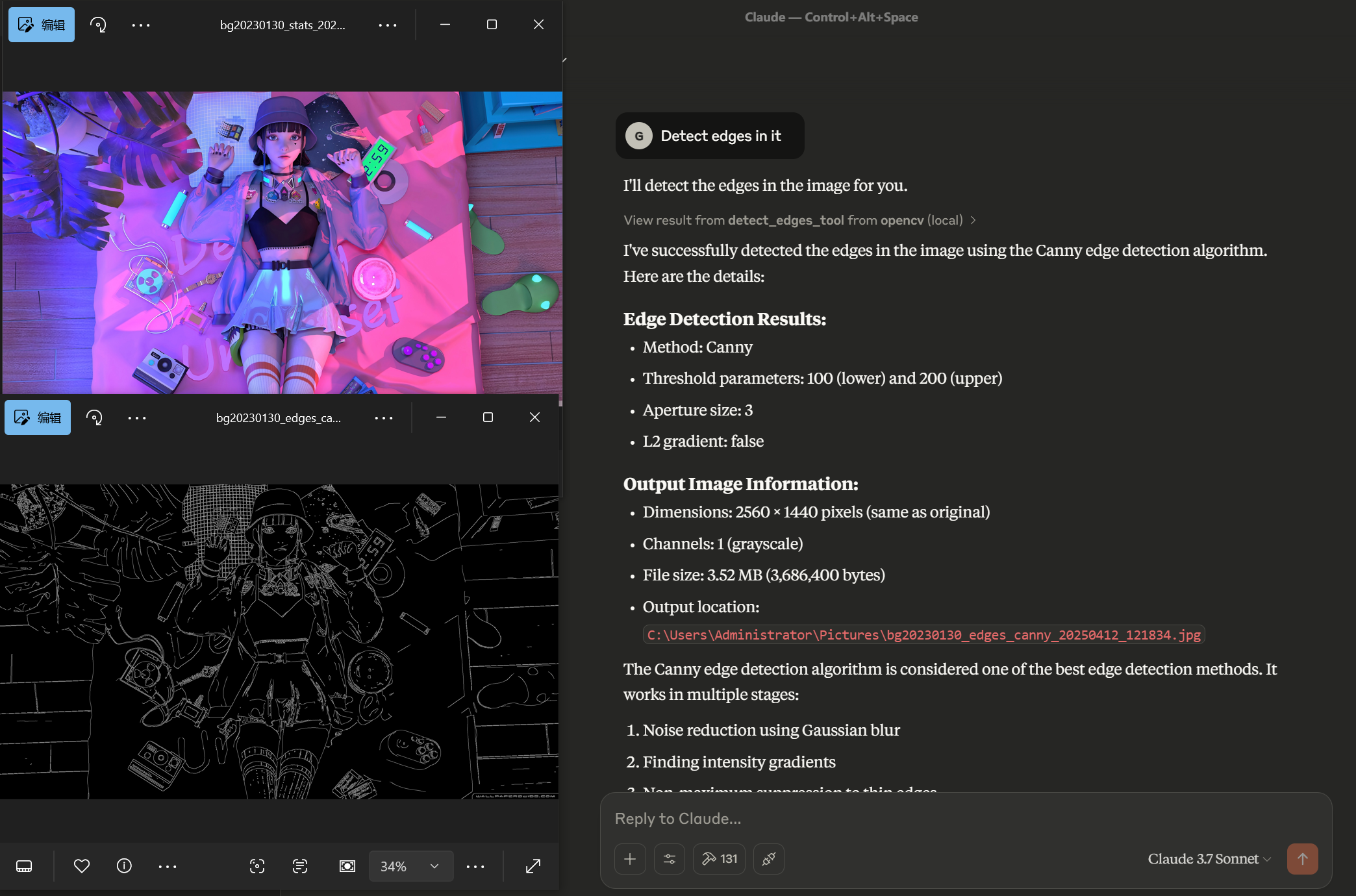
Edge Detection
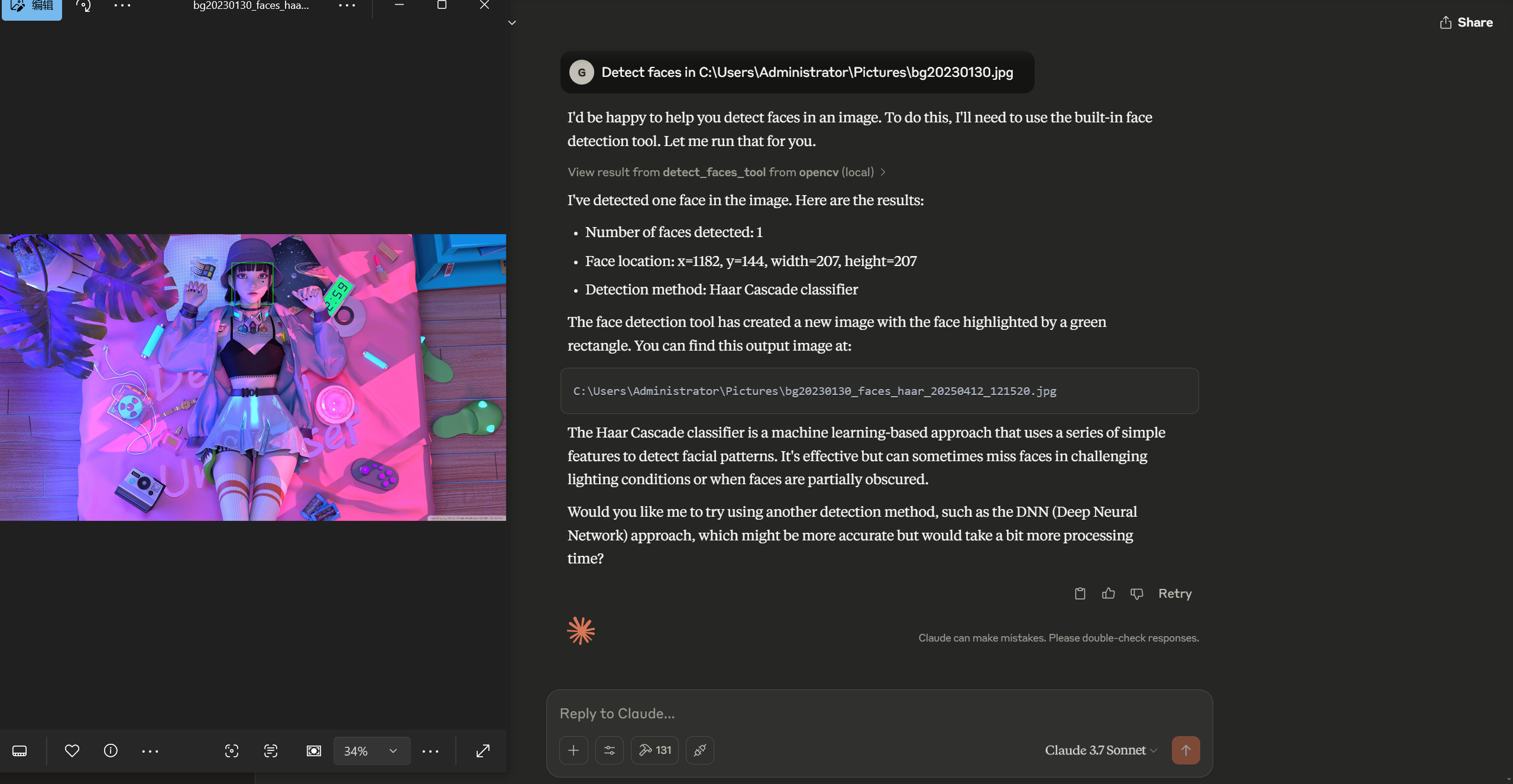
Face Detection
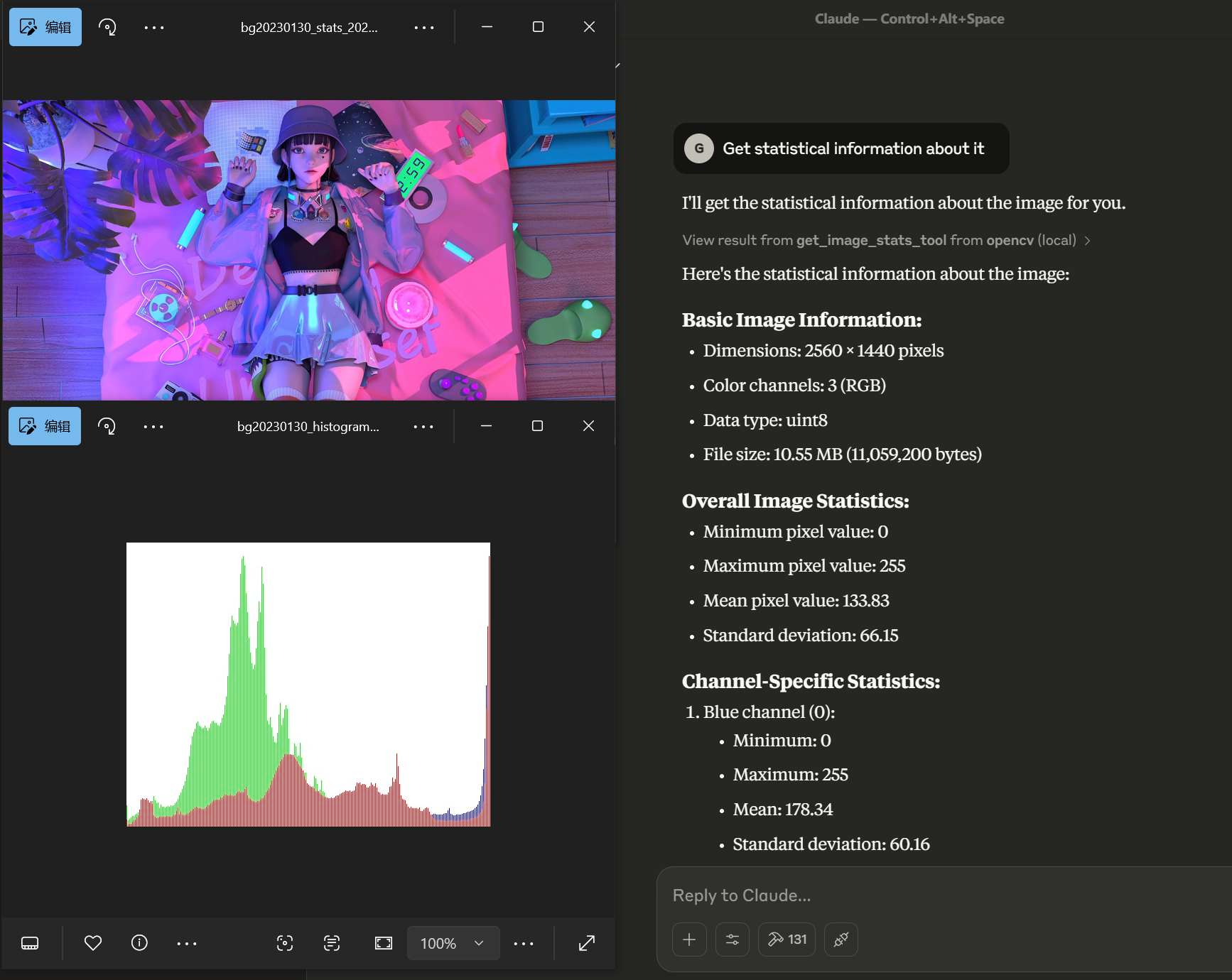
Statistical Analysis
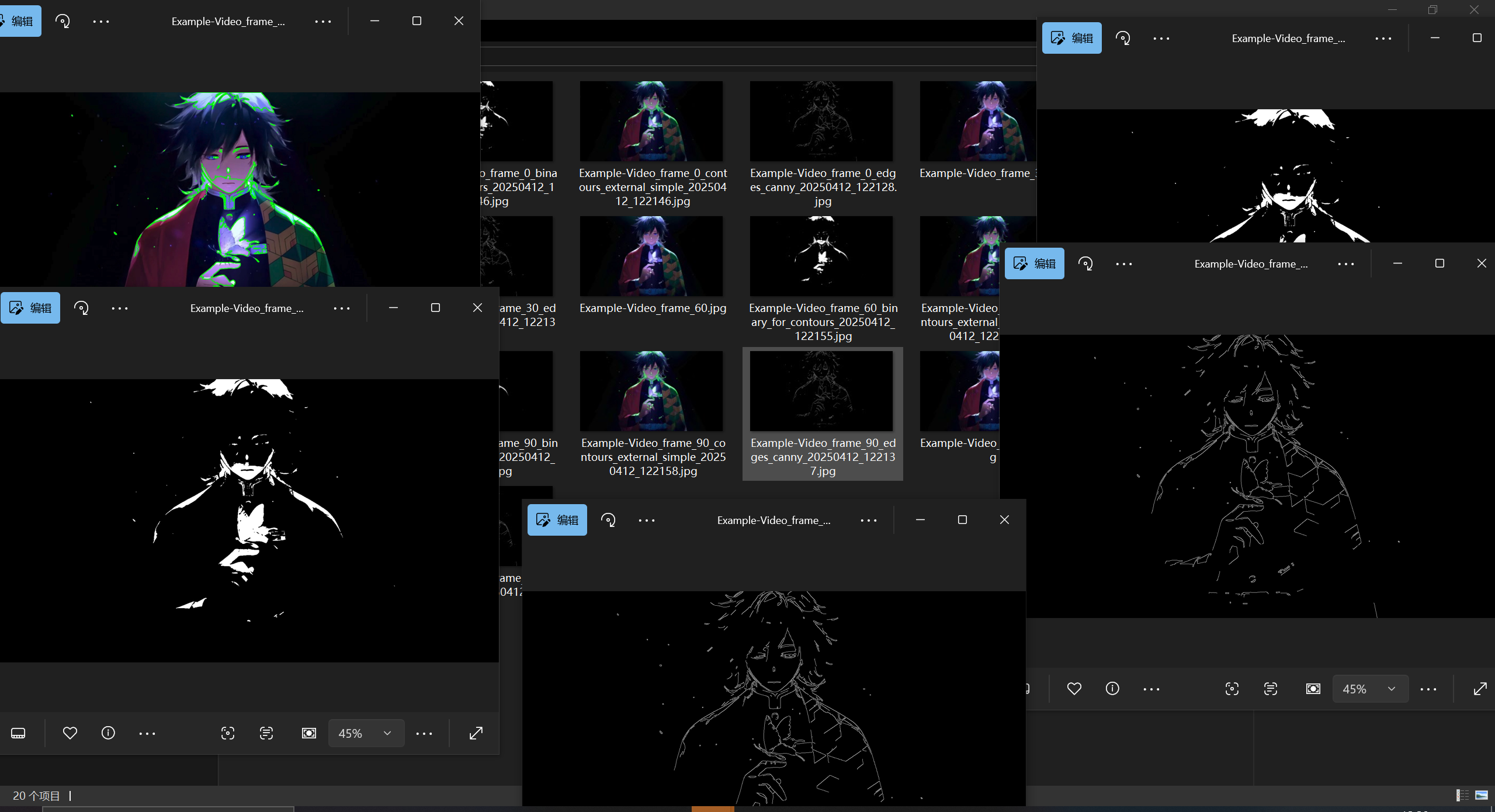
Video Processing
Original Video Sample
Contour Detection Processing
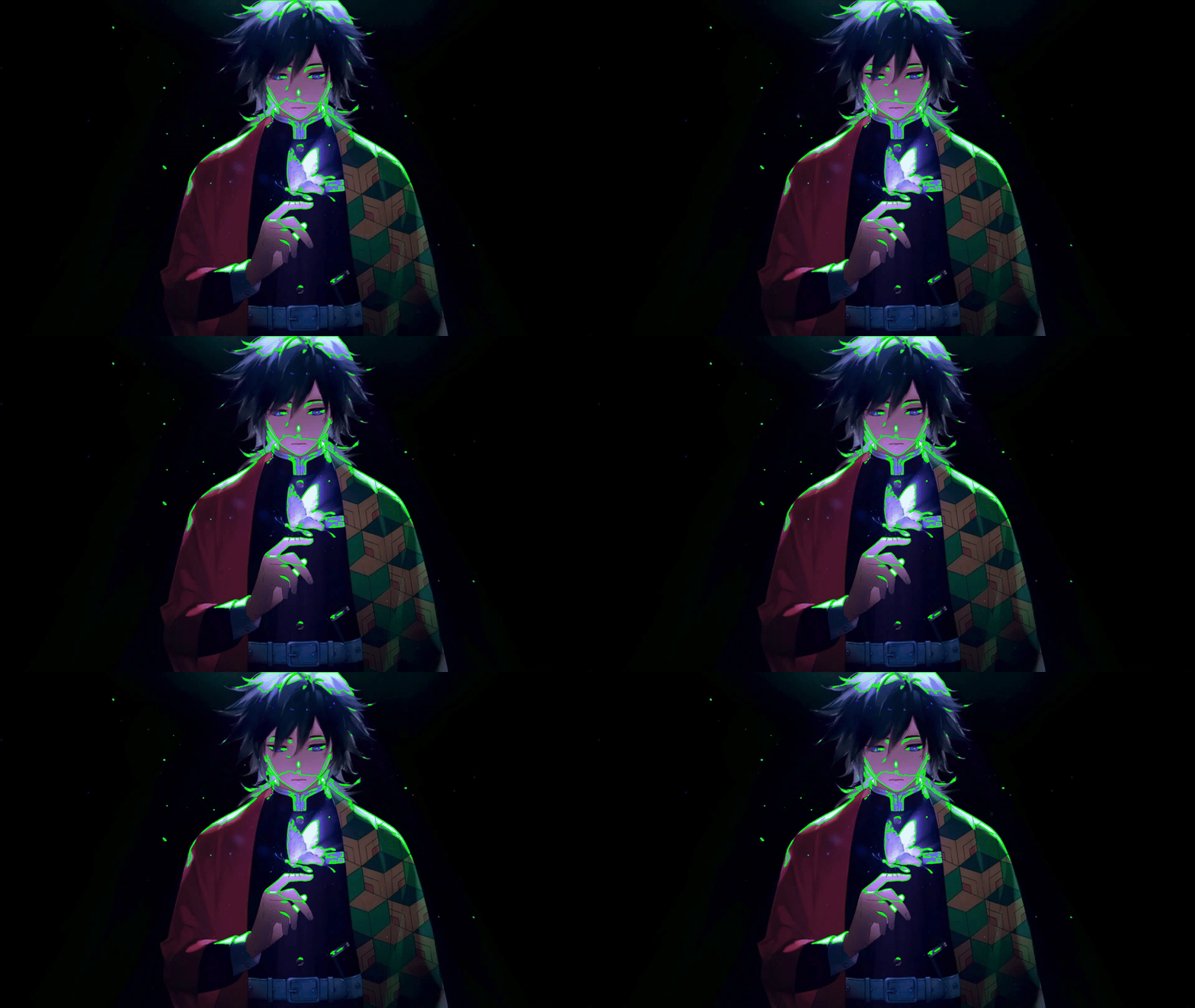
*Example of contour detection processing applied to the original video above*
📦 Installation
pip install opencv-mcp-serverFor development:
# Clone the repository
git clone https://github.com/yourusername/opencv-mcp-server.git
cd opencv-mcp-server

# Create a virtual environment
python -m venv .venv
source .venv/bin/activate  # On Windows: .venv\Scripts\activate

# Install dependencies
pip install -e .
🔧 Usage
Use in Claude Desktop
Add to your Claude Desktop configuration:
{
    "mcpServers": {
        "opencv": {
            "command": "uvx",
            "args": [
                "opencv-mcp-server"
            ]
        }
    }
}
Install uvx
brew install uvThen restart Claude Desktop
Basic Python Usage
from opencv_mcp_server import opencv_client

# Initialize client
client = opencv_client.OpenCVClient()

# Use tools
result = client.resize_image(
    image_path="input.jpg",
    width=800,
    height=600
)
Advanced Object Detection Example
Since all required models are already configured in the `OPENCV_DNN_MODELS_DIR`, you can use object detection without specifying model paths:
# Detect objects using pre-configured YOLO model
result = detect_objects_tool(
    image_path="street.jpg",
    confidence_threshold=0.5,
    nms_threshold=0.4
)
Configuration
The server can be configured using environment variables:
- `MCP_TRANSPORT`: Transport method (default: "stdio")
- `OPENCV_DNN_MODELS_DIR`: Directory for storing DNN models (default: "models")
- `CV_HAAR_CASCADE_DIR`: Directory for storing Haar cascade files (optional)
🧠 Model Files Setup
The computer vision and object detection tools require pre-trained models to function properly. These models should be placed in the directory specified by the `OPENCV_DNN_MODELS_DIR` environment variable (default: "./models").
Required Models
The following models have been pre-configured:
- Face Detection (DNN method)
- `deploy.prototxt` - Face detection configuration
- `res10_300x300_ssd_iter_140000.caffemodel` - Face detection model weights
- Object Detection (YOLO)
- `yolov3.weights` - YOLO model weights
- `yolov3.cfg` - YOLO configuration file
- `coco.names` - Class names for detected objects
Model Usage
- The `detect_faces_tool` uses the DNN models when `method="dnn"` is specified
- The `detect_objects_tool` uses the YOLO models for general object detection
For those who need to download these models, see the "Installation" section or visit:
- YOLO models: https://pjreddie.com/darknet/yolo/
- Face detection models: https://github.com/opencv/opencv_3rdparty/tree/dnn_samples_face_detector_20170830
🧰 Available Tools
The OpenCV MCP Server provides a wide range of computer vision tools organized into four categories:
📸 Image Basics
These tools provide fundamental image manipulation capabilities:
- `save_image_tool`: Save an image to a file
- Parameters: `path_in` (input image path), `path_out` (output file path)
- Returns: Image save status and path information
- Example: `save_image_tool(path_in="processed.jpg", path_out="final.jpg")`
- `convert_color_space_tool`: Convert image between color spaces (BGR, RGB, GRAY, HSV, etc.)
- Parameters: `image_path`, `source_space`, `target_space`
- Returns: Converted image information and path
- Example: `convert_color_space_tool(image_path="image.jpg", source_space="BGR", target_space="HSV")`
- `resize_image_tool`: Resize an image to specific dimensions
- Parameters: `image_path`, `width`, `height`, `interpolation` (optional)
- Returns: Resized image information and path
- Example: `resize_image_tool(image_path="large.jpg", width=800, height=600)`
- `crop_image_tool`: Crop a region from an image
- Parameters: `image_path`, `x`, `y`, `width`, `height`
- Returns: Cropped image information and path
- Example: `crop_image_tool(image_path="scene.jpg", x=100, y=150, width=300, height=200)`
- `get_image_stats_tool`: Get statistical information about an image
- Parameters: `image_path`, `channels` (boolean, default: true)
- Returns: Image statistics and histogram visualization
- Example: `get_image_stats_tool(image_path="photo.jpg", channels=True)`
🖼️ Image Processing
These tools provide advanced image processing and transformation capabilities:
- `apply_filter_tool`: Apply various filters to an image (blur, gaussian, median, bilateral)
- Parameters: `image_path`, `filter_type`, `kernel_size`, and filter-specific parameters
- Returns: Filtered image and filter information
- Example: `apply_filter_tool(image_path="noisy.jpg", filter_type="gaussian", kernel_size=5)`
- `detect_edges_tool`: Detect edges in an image using different methods (Canny, Sobel, Laplacian, Scharr)
- Parameters: `image_path`, `method`, threshold parameters, and method-specific parameters
- Returns: Edge-detected image and method information
- Example: `detect_edges_tool(image_path="objects.jpg", method="canny", threshold1=100, threshold2=200)`
- `apply_threshold_tool`: Apply threshold to an image (binary, adaptive, etc.)
- Parameters: `image_path`, `threshold_type`, threshold values and method-specific parameters
- Returns: Thresholded image and threshold information
- Example: `apply_threshold_tool(image_path="scan.jpg", threshold_type="binary", threshold_value=127)`
- `detect_contours_tool`: Detect and optionally draw contours in an image
- Parameters: `image_path`, `mode`, `method`, drawing parameters
- Returns: Image with contours and contour information
- Example: `detect_contours_tool(image_path="shapes.jpg", mode="external", method="simple")`
- `find_shapes_tool`: Find basic shapes in an image (circles, lines)
- Parameters: `image_path`, `shape_type`, shape-specific parameters
- Returns: Image with shapes and shape information
- Example: `find_shapes_tool(image_path="geometry.jpg", shape_type="circles", min_radius=10)`
- `match_template_tool`: Find a template in an image
- Parameters: `image_path`, `template_path`, matching parameters
- Returns: Image with matches and match information
- Example: `match_template_tool(image_path="scene.jpg", template_path="object.jpg", threshold=0.8)`
🧠 Computer Vision
These tools provide high-level computer vision capabilities:
- `detect_features_tool`: Detect features in an image using methods like SIFT, ORB, BRISK
- Parameters: `image_path`, `method`, `max_features`, drawing parameters
- Returns: Image with keypoints and feature information
- Example: `detect_features_tool(image_path="landmark.jpg", method="sift", max_features=500)`
- `match_features_tool`: Match features between two images
- Parameters: `image1_path`, `image2_path`, `method`, matching parameters
- Returns: Image with matches and match information
- Example: `match_features_tool(image1_path="scene1.jpg", image2_path="scene2.jpg", method="sift")`
- `detect_faces_tool`: Detect faces in an image using Haar cascades or DNN
- Parameters: `image_path`, `method`, method-specific parameters
- Returns: Image with faces and face information
- Example: `detect_faces_tool(image_path="group.jpg", method="haar", min_neighbors=5)`
- `detect_objects_tool`: Detect objects using pre-trained DNN models (e.g., YOLO)
- Parameters: `image_path`, model paths, detection parameters
- Returns: Image with objects and object information
- Example: `detect_objects_tool(image_path="street.jpg", confidence_threshold=0.5)`
🎬 Video Processing
These tools provide video analysis and processing capabilities:
- `extract_video_frames_tool`: Extract frames from a video file
- Parameters: `video_path`, frame selection parameters
- Returns: Extracted frames information and paths
- Example: `extract_video_frames_tool(video_path="clip.mp4", start_frame=0, step=10, max_frames=20)`
- `detect_motion_tool`: Detect motion between two frames
- Parameters: `frame1_path`, `frame2_path`, detection parameters
- Returns: Motion detection results and visualizations
- Example: `detect_motion_tool(frame1_path="frame1.jpg", frame2_path="frame2.jpg", threshold=25)`
- `track_object_tool`: Track an object across video frames
- Parameters: `video_path`, `initial_bbox`, tracking parameters
- Returns: Tracking results and extracted frames
- Example: `track_object_tool(video_path="tracking.mp4", initial_bbox=[100, 100, 50, 50])`
- `combine_frames_to_video_tool`: Combine frames into a video file
- Parameters: `frame_paths`, `output_path`, video parameters
- Returns: Video creation results
- Example: `combine_frames_to_video_tool(frame_paths=["frame1.jpg", "frame2.jpg"], output_path="output.mp4")`
- `create_mp4_from_video_tool`: Convert a video file to MP4 format
- Parameters: `video_path`, `output_path`, conversion parameters
- Returns: Conversion results including MP4 path
- Example: `create_mp4_from_video_tool(video_path="input.avi", output_path="output.mp4")`
- `detect_video_objects_tool`: Detect objects in a video and create a detection result video
- Parameters: `video_path`, model paths, detection parameters
- Returns: Object detection results and output video path
- Example: `detect_video_objects_tool(video_path="traffic.mp4", confidence_threshold=0.5)`
- `detect_camera_objects_tool`: Detect objects from computer's camera and save to video
- Parameters: `camera_id`, recording parameters, model paths, detection parameters
- Returns: Object detection results and output video path
- Example: `detect_camera_objects_tool(camera_id=0, duration=30, confidence_threshold=0.5)`
📝 Advanced Usage Examples
📸 Basic Image Processing
# Resize an image
result = resize_image_tool(
    image_path="input.jpg",
    width=800,
    height=600
)
# Access the resized image path
resized_image_path = result["output_path"]

# Apply a Gaussian blur filter
result = apply_filter_tool(
    image_path="input.jpg",
    filter_type="gaussian",
    kernel_size=5,
    sigma=1.5
)
🧠 Object Detection
# Detect objects in an image using YOLO
result = detect_objects_tool(
    image_path="scene.jpg",
    confidence_threshold=0.5,
    nms_threshold=0.4
)
# Access detected objects
objects = result["objects"]
for obj in objects:
    print(f"Detected {obj['class_name']} with confidence {obj['confidence']}")
🎬 Video Analysis
# Extract frames from a video
result = extract_video_frames_tool(
    video_path="input.mp4",
    start_frame=0,
    step=10,
    max_frames=10
)
# Access extracted frames
frames = result["frames"]

# Detect objects in a video
result = detect_video_objects_tool(
    video_path="input.mp4",
    confidence_threshold=0.5,
    frame_step=5
)
🔄 Chaining Operations
Tools can be chained together by using the `output_path` from one tool as the input to another:
# First resize an image
result1 = resize_image_tool(
    image_path="input.jpg",
    width=800,
    height=600
)

# Then apply edge detection to the resized image
result2 = detect_edges_tool(
    image_path=result1["output_path"],
    method="canny",
    threshold1=100,
    threshold2=200
)

# Finally detect contours in the edge-detected image
result3 = detect_contours_tool(
    image_path=result2["output_path"],
    mode="external",
    method="simple"
)
🔍 Real-world Applications
OpenCV MCP Server can be used for a wide range of applications:
- 🤖 Autonomous Systems: Vision-based navigation and obstacle detection
- 🚗 Traffic Analysis: Vehicle counting, speed estimation, and license plate recognition
- 🔐 Security Systems: Motion detection and facial recognition
- 📱 Augmented Reality: Feature tracking and pose estimation
- 🏥 Medical Imaging: Tissue segmentation and anomaly detection
- 🏭 Industrial Inspection: Defect detection and quality control
- 🖼️ Digital Art: Image filtering and transformation
- 🎲 Gaming: Gesture recognition and player tracking
🗺️ Roadmap
Future enhancements planned for OpenCV MCP Server:
- 📊 Additional statistical analysis tools
- 🧬 Advanced segmentation algorithms
- 🧠 Integration with machine learning models
- 🌐 3D vision capabilities
- 📱 Mobile-friendly processing options
- ⚡ Performance optimizations for real-time processing
🤝 Contributing
Contributions are welcome! Please feel free to submit a Pull Request.
1. Fork the project
2. Create your feature branch (`git checkout -b feature/amazing-feature`)
3. Commit your changes (`git commit -m 'Add some amazing feature'`)
4. Push to the branch (`git push origin feature/amazing-feature`)
5. Open a Pull Request
📜 License
MIT License - See the LICENSE file for details.
📞 Contact
For questions or feedback, please open an issue on the GitHub repository.
Built with ❤️ using OpenCV and Python.
Frequently asked questions
What is opencv-mcp-server?
opencv-mcp-server is OpenCV MCP Server provides OpenCV's image and video processing capabilities through the Model Context Protocol (MCP). Access powerful computer vision tools for tasks ranging from basic image manipulation to advanced object detection and tracking.
How do I install opencv-mcp-server?
Open the GitHub repository and follow its README. Most MCP servers are added to your client's MCP config, then called by your agent.
Is opencv-mcp-server open source?
Yes — it is hosted on GitHub at https://github.com/GongRzhe/opencv-mcp-server and has 78 stars.
Related MCP tools
 openhands
🙌 OpenHands: Code Less, Make More for the Model Context Protocol. Enhance AI assistants with powerful integrations. Python-based implementation.
 mem0
mem0Universal memory layer for AI Agents; Announcing OpenMemory MCP - local and secure memory management. Python-based implementation.
 chatgpt-on-wechat
基于大模型搭建的聊天机器人,同时支持 微信公众号、企业微信应用、飞书、钉钉 等接入,可选择ChatGPT/Claude/DeepSeek/文心一言/讯飞星火/通义千问/ Gemini/GLM-4/Kimi/LinkAI,能处理文本、语音和图片,访问操作系统和互联网,支持基于自有知识库进行定制企业智能客服。
 gpt-researcher
An LLM agent that conducts deep research (local and web) on any given topic and generates a long report with citations. Built for the Model Context Protocol to
 fastmcp
🚀 The fast, Pythonic way to build MCP servers and clients Trusted by 19900+ developers. Trusted by 19900+ developers. Trusted by 19900+ developers.
 maxkb
maxkb🔥 MaxKB is an open-source platform for building enterprise-grade agents. MaxKB 是强大易用的开源企业级智能体平台。 for the Model Context Protocol. Enhance AI assistants with po
Run your own MCP server? See who uses it and what to fix.
Measure it with TrackMCP