
mcp-server-tmdb
MCP Server with TMDB
Documentation
TMDB MCP Server
An MCP server for The Movie Database (TMDB) API. It provides movie and TV search, streaming availability, cast and crew details, and recommendations for assistants such as Codex and Claude Desktop.
For the architecture split between the reusable MCP server and higher-level feature workflows, see USERGUIDE.md.
Tools
Movie Discovery
- get_weekend_watchlist — Ranked weekend shortlist by mood, country, language, runtime, rating, and services
- plan_watch_party — Group movie-night plan with a primary pick, backup, wildcard, party-fit reasons, provider availability, and avoided-title filtering
- build_franchise_watch_order — Franchise/universe guide with release order, suggested order, total runtime, and provider-aware notes
- build_collection_gap_plan — Franchise completion plan with watched/missing entries, remaining runtime, provider availability, and completion path
- recommend_from_taste_profile — Recommendations from liked/disliked titles with provider-aware scoring, match reasons, and cautions
- build_release_calendar_watchlist — Release-window watchlist with upcoming movies, provider-ready picks, broad-room baselines, and watch-later scoring
- search_movies — Search by title/keywords → titles, IDs, ratings, overviews
- get_trending — Top 10 trending movies (`timeWindow`: "day" | "week")
- get_weekly_trending_by_language — Weekly trending movies grouped by original language into English, Hindi, and Telugu
- search_by_genre — Movies by genre name, optional year filter
- advanced_search — Filter by genre, year, min rating, sort, language
- search_by_keyword — Find movies by theme/keyword (e.g. "zombie", "heist")
Movie Details
- get_movie_details — Full details: cast, crew, runtime, genres, reviews (by `movieId`)
- compare_movies — Side-by-side comparison for 2-5 movie IDs with ratings, runtime, cast, director, providers, and best-fit notes
- get_recommendations — Top 5 recommendations based on a movie ID
- get_similar_movies — Similar movies via TMDB's similarity algorithm
- get_watch_providers — Streaming/rental/purchase availability by country (default: IN)
- find_where_to_watch — Search 1-5 movie titles and return streaming/rental/purchase availability with preferred-service matches
TV Shows
- search_tv_shows — Search TV series by title
- get_trending_tv — Top 10 trending TV shows (`timeWindow`: "day" | "week")
People
- search_person — Find actors, directors, crew by name → ID + known works
- get_person_details — Full bio + filmography (movies + TV) by `personId`
- build_person_watch_path — Actor/director watch path with best-rated, available-now, recent, and starter picks
Resources
- `tmdb:///movie/` — Full movie details in JSON (title, cast, director, reviews, poster URL)
Quick Start
1. Get a TMDB API key at themoviedb.org → Account Settings → API
2. Clone, install, and build:
git clone https://github.com/Laksh-star/mcp-server-tmdb.git
   cd mcp-server-tmdb
   npm install
3. Create a local env file and add your TMDB key:
cp .env.example .env4. Install the local Codex and Claude Desktop integration:
npm run install:local5. Restart Codex or Claude Desktop if already open.
6. Verify with a prompt like:
What movies are trending this week?In Codex, a fresh session should show `TMDB` in the plugin list and expose the `mcp__tmdb__` namespace.
Tool Surface Smoke
Use this smoke test after adding or merging tools. It verifies the expected MCP tool contract and calls the main workflow tools: `compare_movies`, `find_where_to_watch`, `get_weekend_watchlist`, `plan_watch_party`, `build_franchise_watch_order`, `build_collection_gap_plan`, `recommend_from_taste_profile`, and `build_person_watch_path`.
Local stdio MCP:
npm run build
set -a && source ./.env && set +a && npm run smoke:tools
Cloudflare-hosted MCP:
TMDB_MCP_ACCESS_TOKEN= node scripts/tool-surface-smoke.mjs --mcp-url https://tmdb-mcp..workers.dev/mcpThe script writes a compact verification artifact to:
examples/tool-surface-smoke.mdTo avoid tool bloat, prefer adding workflow tools that combine multiple TMDB calls into a useful user decision. Keep raw endpoint-style tools only when they are broadly reusable primitives.
Weekly Trending Language Demo
This repo includes a small shareable demo that calls the MCP tool `get_weekly_trending_by_language`, which fetches live TMDB weekly trending movies and groups the current first page by TMDB `original_language`.
Run it against the local stdio MCP server:
npm run build
set -a && source ./.env && set +a && npm run demo:weekly-trending
After deploying this version of the Worker, run the same demo against a remote MCP endpoint:
TMDB_MCP_ACCESS_TOKEN= node scripts/weekly-trending-languages.mjs --mcp-url https://tmdb-mcp..workers.dev/mcpIf the deployment is intentionally authless for personal testing, omit `TMDB_MCP_ACCESS_TOKEN`.
Weekly Streaming Radar
This repo also includes a script-first weekly radar. It chains existing MCP tools into a Markdown artifact with movie trends, TV trends, language momentum, action-ready picks, family-safe picks, and a taste-profile probe.
Local stdio MCP:
npm run build
set -a && source ./.env && set +a && npm run demo:weekly-radar -- --country US
Cloudflare-hosted MCP:
TMDB_MCP_ACCESS_TOKEN= node scripts/weekly-streaming-radar.mjs --mcp-url https://tmdb-mcp..workers.dev/mcp --country USThe script writes:
examples/weekly-streaming-radar.mdRelease Calendar Watchlist
The release calendar is available as the MCP tool `build_release_calendar_watchlist`. The demo script calls that tool and writes a Markdown artifact for release-window scanning, watch-later candidates, provider-ready picks, and broad-room baselines.
Local stdio MCP:
npm run build
set -a && source ./.env && set +a && npm run demo:release-calendar -- --country US --days 90
Cloudflare-hosted MCP:
TMDB_MCP_ACCESS_TOKEN= node scripts/release-calendar-watchlist.mjs --mcp-url https://tmdb-mcp..workers.dev/mcp --country US --days 90The script writes:
examples/release-calendar-watchlist.mdProvider Change Monitor
The provider monitor is script-first because it needs persisted state. It calls `find_where_to_watch`, compares the current provider list against a JSON snapshot, and writes a Markdown delta report showing new, removed, unchanged, and missing provider availability.
Local stdio MCP:
npm run build
set -a && source ./.env && set +a && npm run demo:provider-monitor -- --country US --titles "The Matrix,Inception" --services "Netflix,Prime Video"
Cloudflare-hosted MCP:
TMDB_MCP_ACCESS_TOKEN= node scripts/provider-change-monitor.mjs --mcp-url https://tmdb-mcp..workers.dev/mcp --country US --titles "The Matrix,Inception" --services "Netflix,Prime Video"The script writes:
examples/provider-change-monitor.md
examples/provider-change-snapshot.json
Collection Gap Finder
The collection gap finder script now calls the promoted MCP tool `build_collection_gap_plan` and writes a repeatable Markdown completion report with watched entries, missing entries, remaining runtime, provider availability, and a shortest completion path.
Local stdio MCP:
npm run build
set -a && source ./.env && set +a && npm run demo:collection-gaps -- --franchise "The Matrix" --watched "The Matrix" --country US --services "Netflix,Prime Video"
Cloudflare-hosted MCP:
TMDB_MCP_ACCESS_TOKEN= node scripts/collection-gap-finder.mjs --mcp-url https://tmdb-mcp..workers.dev/mcp --franchise "The Matrix" --watched "The Matrix" --country US --services "Netflix,Prime Video"The script writes:
examples/collection-gap-finder.mdRemote MCP on Cloudflare Workers
This repo can also run as a remote MCP server on Cloudflare Workers. The remote server exposes the same TMDB tools at `/mcp` over Streamable HTTP, so Claude, Cowork, Claude Desktop connectors, and other remote-MCP clients can connect to a public URL.
The existing local stdio server remains unchanged for Codex and local Claude Desktop use. The Cloudflare entrypoint is `src/worker.ts`.
The Worker also serves a browser demo at `/`: Weekend Watch Concierge. It supports solo picks and Watch Party mode, then builds a ranked movie shortlist using TMDB discovery, trending, now-playing, credits, posters, and watch-provider data. The browser app also includes a Help drawer for Cloudflare usage and a Workflow Demos panel with commands for script-first artifacts such as Weekly Streaming Radar, Provider Change Monitor, and Collection Gap Finder.
The browser demo also includes an MCP tool surface panel that calls the deployed `/mcp` route, verifies the expected tool contract, and samples `compare_movies`, `find_where_to_watch`, `get_weekend_watchlist`, `plan_watch_party`, `build_franchise_watch_order`, `build_collection_gap_plan`, `recommend_from_taste_profile`, and `build_person_watch_path`.
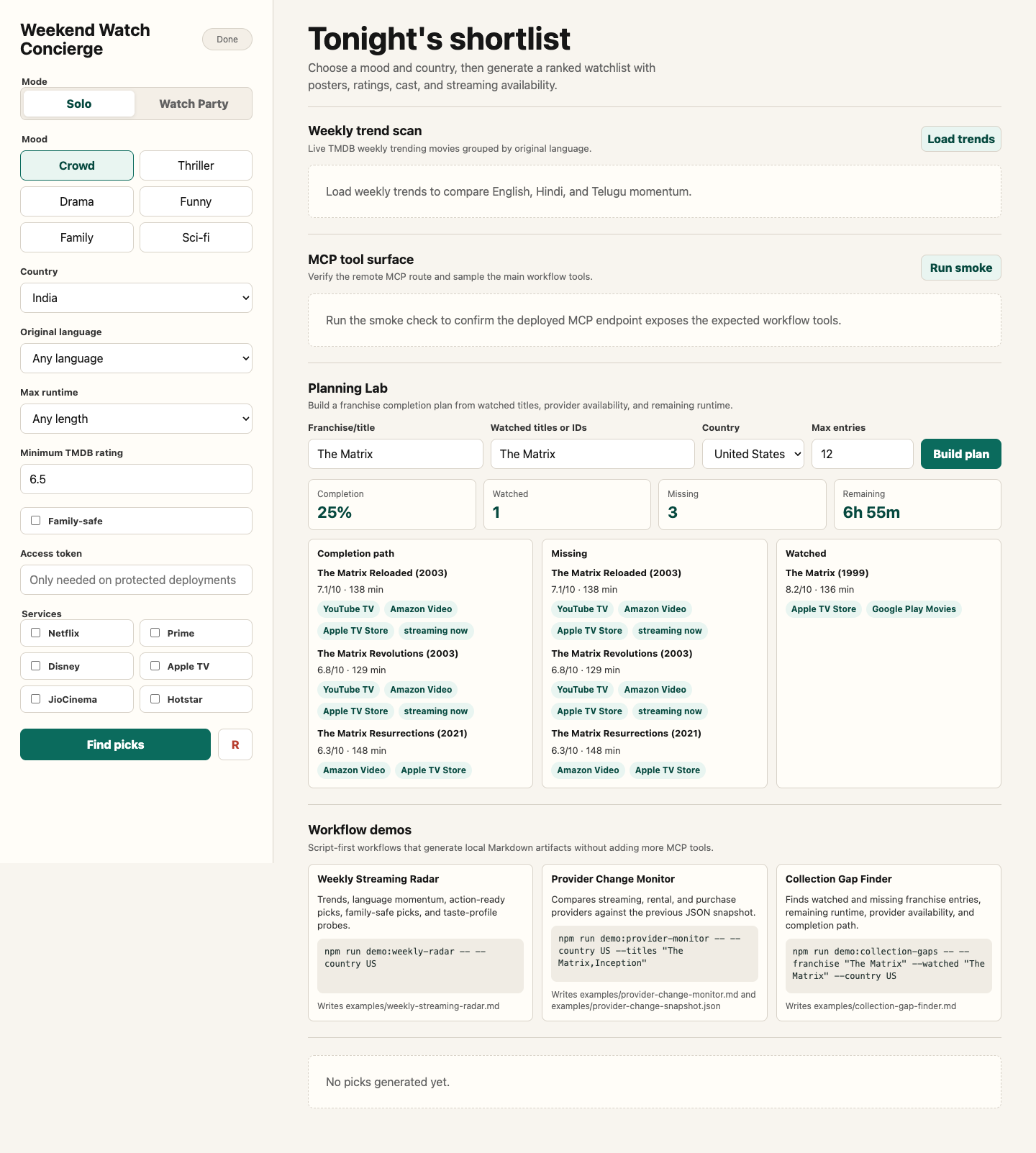
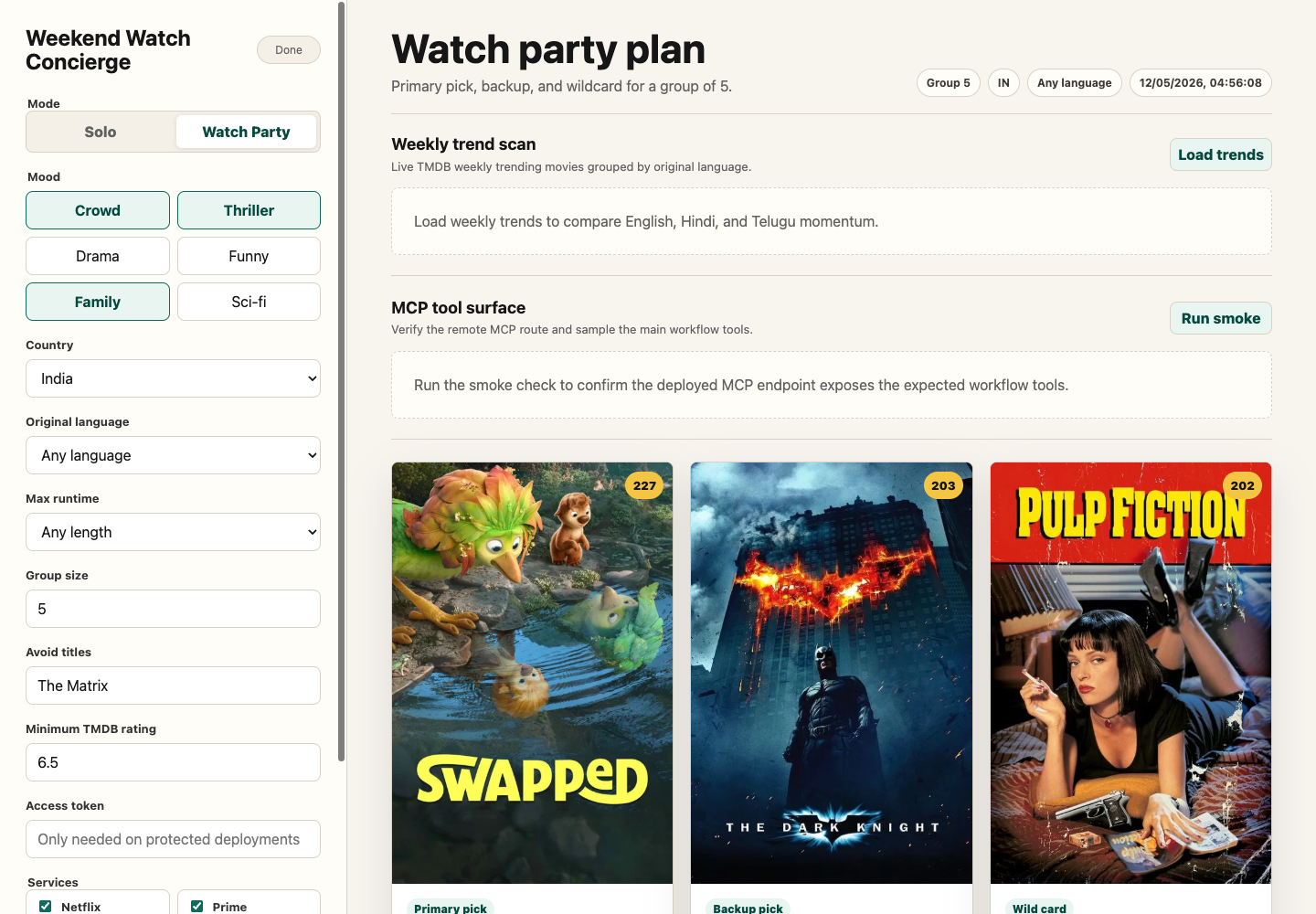
For the complete browser app, deployed Worker, access-token, and MCP handoff, see `docs/weekend-watch-concierge.md`.
Deploy
1. Log in to Cloudflare:
npx wrangler login2. Store your TMDB key as a Worker secret:
npx wrangler secret put TMDB_API_KEY3. Store an access token as a Worker secret before sharing the deployment:
npx wrangler secret put ACCESS_TOKENWhen `ACCESS_TOKEN` is set, `POST /api/concierge` and `POST /mcp` require:
Authorization: Bearer4. Check the Worker bundle:
npm run worker:dry-run5. Deploy:
npm run worker:deployCloudflare will print a URL like:
https://tmdb-mcp..workers.devUse this MCP endpoint in remote clients:
https://tmdb-mcp..workers.dev/mcpUse this browser demo URL:
https://tmdb-mcp..workers.dev/Connect from Claude / Cowork
For Claude custom connectors:
1. Open Claude settings: `Customize` -> `Connectors`.
2. Click `+` -> `Add custom connector`.
3. Use the deployed Worker MCP URL:
https://tmdb-mcp..workers.dev/mcp4. Enable the connector in a conversation and ask a TMDB question, such as:
What movies are trending this week?For Claude Desktop versions or MCP clients that still require a local command, use the `mcp-remote` proxy:
{
  "mcpServers": {
    "tmdb-remote": {
      "command": "npx",
      "args": [
        "mcp-remote",
        "https://tmdb-mcp..workers.dev/mcp"
      ]
    }
  }
}
Security note
If `ACCESS_TOKEN` is not configured, the Worker is authless for easy personal testing. Anyone who has the Worker URL can call the read-only TMDB tools and consume your TMDB API quota. Keep `ACCESS_TOKEN` configured or use Cloudflare Access before sharing this beyond your own accounts.
Weekend Watch Concierge
Run the offline concierge test:
npm testThis builds the TypeScript project, starts a tiny local TMDB-compatible fixture server, and verifies that `createWeekendConcierge` ranks a requested streaming-service match first while respecting the runtime filter. It does not need a TMDB API key.
Run the Worker locally:
npm run worker:devThis syncs local values from `.env` into an untracked `.dev.vars` file so Wrangler can expose `TMDB_API_KEY` to the Worker during local development.
For protected local testing, add `ACCESS_TOKEN` to `.env`. The browser app has an access-token field and the smoke scripts can read `ACCESS_TOKEN` or `TMDB_MCP_ACCESS_TOKEN` from the shell environment.
Open:
http://127.0.0.1:8787/Smoke test the concierge API after the local Worker is running:
npm run smoke:conciergeSmoke test the remote MCP endpoint and call the agent-facing concierge tool:
node scripts/remote-mcp-smoke.mjs http://127.0.0.1:8787/mcp --call-conciergeFor a protected deployment:
TMDB_MCP_ACCESS_TOKEN= node scripts/remote-mcp-smoke.mjs https://tmdb-mcp..workers.dev/mcp --call-conciergeOr test a deployed Worker:
node scripts/concierge-smoke.mjs https://tmdb-mcp..workers.devThe app uses:
- `POST /api/concierge` for ranked movie picks
- `POST /api/collection-gap-plan` for Planning Lab collection gaps
- `POST /api/taste-profile` for Planning Lab taste-fit recommendations
- `POST /api/person-watch-path` for Planning Lab person watch paths
- `GET /health` for deployment health
- `POST /mcp` for remote MCP clients
Agents can call `get_weekend_watchlist` with:
- `mood`: `crowd`, `thriller`, `thoughtful`, `funny`, `family`, or `mindbend`
- `country`: watch-provider region, for example `IN` or `US`
- `language`: original language code, for example `en`, `hi`, `ta`, `te`, or `any`
- `runtime`: maximum minutes, for example `120`, `150`, or `any`
- `minRating`: minimum TMDB rating
- `services`: preferred streaming services
- `familySafe`: set to `true` to exclude common mature genres when TMDB genre data is available
Agents can call `plan_watch_party` when the decision is for a group. It accepts:
- `moods`: one to three values from `crowd`, `thriller`, `thoughtful`, `funny`, `family`, or `mindbend`
- `groupSize`: number of people watching
- `country`, `language`, `runtime`, `minRating`, and `services`: same meaning as the weekend watchlist
- `avoidTitles`: titles the group has already seen or wants excluded
- `familySafe`: set to `true` to exclude common mature genres when TMDB genre data is available
Agents can call `build_franchise_watch_order` for a collection or universe guide. It accepts:
- `query`: franchise or collection name, for example `The Matrix`, `Dune`, `Batman`, or `Mission Impossible`
- `country`: watch-provider region, for example `IN` or `US`
- `maxMovies`: maximum collection entries to include, from 2 to 20
Agents can call `build_collection_gap_plan` for franchise completion planning. It accepts:
- `query`: franchise or collection name
- `watchedTitles`: watched titles or TMDB movie IDs
- `country`: watch-provider region, for example `IN` or `US`
- `services`: preferred streaming services
- `maxMovies`: maximum collection entries to include, from 2 to 20
Agents can call `recommend_from_taste_profile` for personalized recommendations. It accepts:
- `likedTitles`: one to five movies the user likes
- `dislikedTitles`: optional movies the user dislikes or wants to avoid stylistically
- `country`, `services`, `language`, `runtime`, and `minRating`: filters and watch-now preferences
- `maxResults`: number of recommendations to return, from 3 to 10
Agents can call `build_person_watch_path` for an actor, director, writer, or crew member. It accepts:
- `name`: person name, for example `Keanu Reeves` or `Christopher Nolan`
- `country`: watch-provider region, for example `IN` or `US`
- `services`: preferred streaming services
- `maxTitles`: number of watch-path entries to return, from 3 to 8
Cloudflare MCP Demo Workflow
For a concrete end-to-end agent workflow, run the now-playing follow-on demo. It uses the MCP server as a remote client would:
1. `get_now_playing` for current theater discovery in a selected region
2. `get_movie_details` for the selected title
3. `get_watch_providers` for watch-now availability
4. `get_recommendations`, with `get_similar_movies` fallback for very new titles
5. `get_watch_providers` for follow-on availability checks
Local stdio MCP:
npm run build
set -a && source ./.env && set +a && npm run demo:now-playing -- --region US
Cloudflare-hosted MCP:
TMDB_MCP_ACCESS_TOKEN= node scripts/now-playing-follow-on-demo.mjs --mcp-url https://tmdb-mcp..workers.dev/mcp --region USThe script writes the final artifact here:
examples/now-playing-follow-on-demo.mdWhat `npm run install:local` does
The installer uses the repo-owned launcher at `plugins/tmdb/scripts/run-server.sh`.
For Codex it:
- Registers the launcher as an MCP server
- Installs a local `TMDB` plugin payload so it appears in the plugin UI
For Claude Desktop it:
- Registers the same launcher as a local MCP server
It updates:
- `~/.codex/config.toml`
- `~/.codex/.tmp/plugins/.agents/plugins/marketplace.json`
- `~/.codex/plugins/cache/openai-curated/tmdb/...`
- `~/Library/Application Support/Claude/claude_desktop_config.json`
The launcher reads `TMDB_API_KEY` from your shell environment or from the repo `.env` file.
Usage with Claude Desktop
If you prefer manual setup, add to `~/Library/Application Support/Claude/claude_desktop_config.json`:
{
  "mcpServers": {
    "tmdb-local": {
      "command": "/full/path/to/mcp-server-tmdb/plugins/tmdb/scripts/run-server.sh",
      "args": []
    }
  }
}
Restart Claude Desktop after editing the config.
Usage with Codex
The installer adds these blocks to `~/.codex/config.toml`:
[mcp_servers.tmdb_local]
command = "/full/path/to/mcp-server-tmdb/plugins/tmdb/scripts/run-server.sh"

[plugins."tmdb@openai-curated"]
enabled = true
Restart Codex after editing the config. In a fresh Codex session, `TMDB` should appear in the plugin list and contribute the `mcp__tmdb__` namespace.
Validation
Offline smoke test:
TMDB_API_KEY=dummy node plugins/tmdb/scripts/smoke-test.mjsOnline smoke test:
set -a && source ./.env && set +a && node plugins/tmdb/scripts/smoke-test.mjs --onlinePlugin Docs
For plugin packaging, local install behavior, and Codex-specific notes, see `plugins/tmdb/README.md`.
Usage with BizClaw / NanoClaw
Built into the agent container. Just set `TMDB_API_KEY` in your `.env` file — no configuration needed.
Example Prompts
"What's trending in movies this week?"
"Find me Thriller movies from 2023"
"Who is Christopher Nolan and what has he directed?"
"Where can I watch Inception in India?"
"Get details for movie ID 550 (Fight Club)"
"Find movies similar to Interstellar"
"What are the trending TV shows right now?"
License
MIT
Frequently asked questions
What is mcp-server-tmdb?
mcp-server-tmdb is MCP Server with TMDB
How do I install mcp-server-tmdb?
Open the GitHub repository and follow its README. Most MCP servers are added to your client's MCP config, then called by your agent.
Is mcp-server-tmdb open source?
Yes — it is hosted on GitHub at https://github.com/Laksh-star/mcp-server-tmdb and has 52 stars.
Related MCP tools
 mcp-installer
An MCP server that installs other MCP servers for you JavaScript-based implementation. Trusted by 1400+ developers. Trusted by 1400+ developers.
 ios-simulator-mcp
MCP server for interacting with the iOS simulator JavaScript-based implementation. Trusted by 1200+ developers. Trusted by 1200+ developers.
 mcp-server-mysql
A Model Context Protocol server that provides read-only access to MySQL databases. This server enables LLMs to inspect database schemas and execute read-only...
 mcp-server-youtube-transcript
This is an MCP server that allows you to directly download transcripts of YouTube videos. JavaScript-based implementation.
 anything-llm
The all-in-one Desktop & Docker AI application with built-in RAG, AI agents, No-code agent builder, MCP compatibility, and more.
 claude-task-master
An AI-powered task-management system you can drop into Cursor, Lovable, Windsurf, Roo, and others. Built for the Model Context Protocol to enhance AI capabiliti
Run your own MCP server? See who uses it and what to fix.
Measure it with TrackMCP