
mcp-playground
Simple MCP Client for remote MCP Servers 🌐
Documentation
MCP Playground
A comprehensive Python toolkit for interacting with remote Model Context Protocol (MCP) endpoints. Currently supports Server-Sent Events (SSE) with planned support for Streamable HTTP protocols.
🎯 Project Focus
MCP Playground is specifically designed for remote MCP client capabilities, providing robust tools for connecting to and interacting with MCP servers over network protocols:
- ✅ Server-Sent Events (SSE) - Full implementation with real-time streaming
- 🔄 Streamable HTTP - Planned for future releases
- 🤖 LLM Integration - AI-driven tool selection and execution
- 🧪 Interactive Testing - Comprehensive testing environments
🚀 Quick Start
Get up and running in minutes:
# Clone the repository
git clone https://github.com/zanetworker/mcp-playground.git
cd mcp-playground

# Install the package
pip install -e .

# Try the interactive Streamlit app
cd mcp-streamlit-app
pip install -r requirements.txt
streamlit run app.py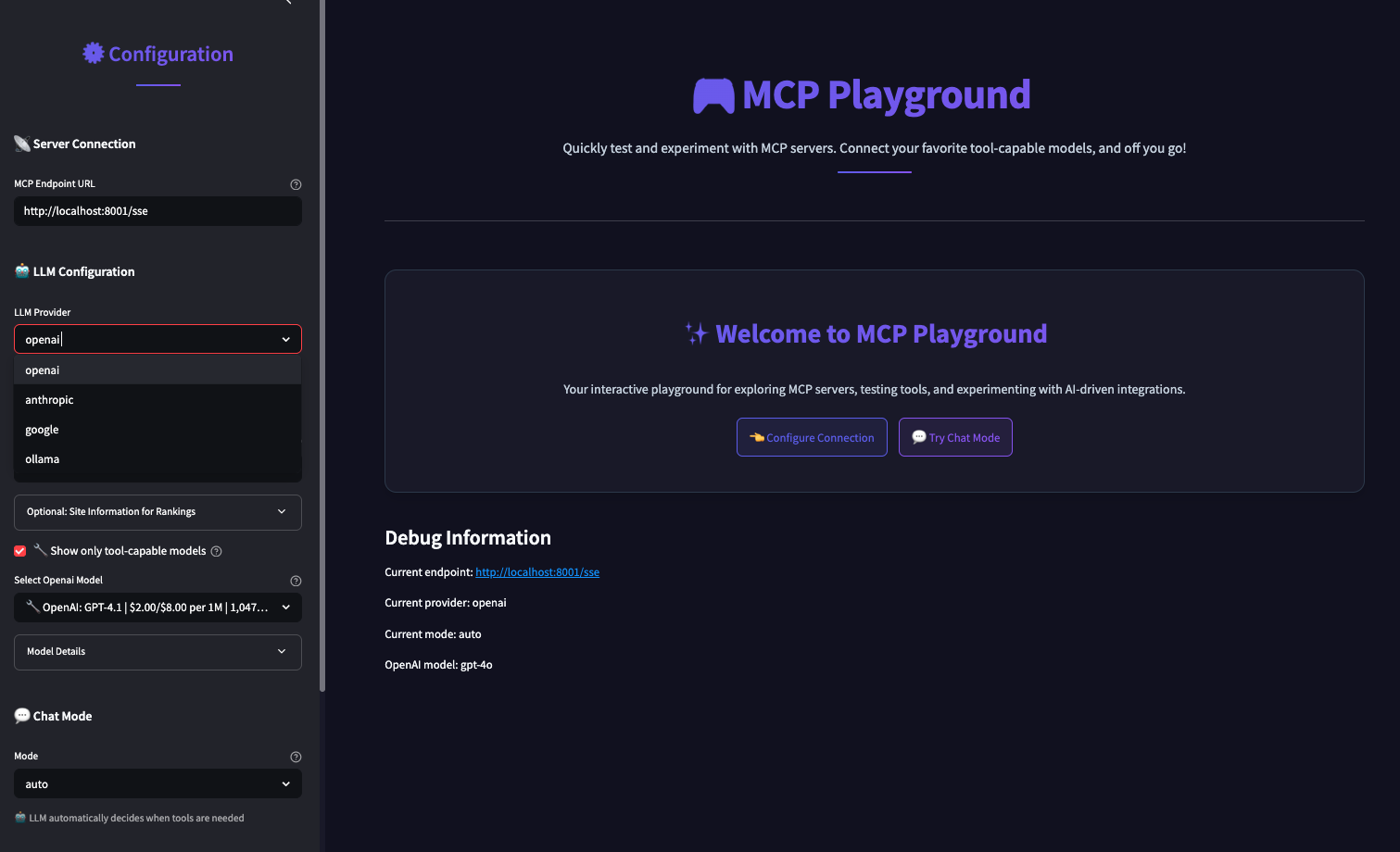
> 🚨 IMPORTANT: When connecting to MCP servers, always use URLs ending with `/sse`
> Example: `http://localhost:8000/sse` (not `http://localhost:8000`)
Environment Variables
For convenience, you can set API keys and OpenRouter configuration via environment variables:
# Required for LLM providers
export OPENAI_API_KEY="your-openai-key"
export ANTHROPIC_API_KEY="your-anthropic-key"
export OPENROUTER_API_KEY="your-openrouter-key"

# Optional OpenRouter configuration for better rankings
export OPENROUTER_SITE_URL="https://your-site.com"
export OPENROUTER_SITE_NAME="Your App Name"
*The Streamlit interface prominently highlights the `/sse` URL requirement with helpful tooltips and validation.*
🛠️ Supported Protocols
Current Support
- Server-Sent Events (SSE) - Real-time streaming communication with MCP servers
- HTTP/HTTPS - Standard request-response patterns
Planned Support
- Streamable HTTP - Enhanced HTTP streaming capabilities
- WebSocket - Bidirectional real-time communication
- gRPC Streaming - High-performance streaming protocol
🤖 LLM Provider Support
MCP Playground integrates with multiple LLM providers for intelligent tool selection:
- OpenAI: GPT-4o, GPT-4, GPT-3.5-Turbo
- Anthropic: Claude 3 Opus, Claude 3 Sonnet, Claude 3 Haiku
- Ollama: Llama 3, Mistral, and other locally hosted models
- OpenRouter: Access to 100+ models through a unified API
📋 Core Features
1. Remote MCP Client
Easily connect to any remote MCP endpoint and interact with available tools:
import asyncio
from mcp_playground import MCPClient

async def main():
    # Connect to a remote MCP endpoint with optional timeout and retry settings
    # IMPORTANT: URL must end with /sse for Server-Sent Events
    client = MCPClient(
        "http://localhost:8000/sse",  # Note the /sse suffix!
        timeout=30.0,      # Connection timeout in seconds
        max_retries=3      # Maximum retry attempts
    )

    # List available tools
    tools = await client.list_tools()
    print(f"Found {len(tools)} tools")

    # Invoke a calculator tool
    result = await client.invoke_tool(
        "calculator",
        {"x": 10, "y": 5, "operation": "add"}
    )
    print(f"Result: {result.content}")  # Output: Result: 15
    print(f"Success: {result.error_code == 0}")

asyncio.run(main())
2. LLM-Powered Tool Selection
Let AI choose the right tool based on natural language queries:
import os
from mcp_playground import MCPClient, OpenAIBridge

# Connect to MCP endpoint and create an LLM bridge
client = MCPClient("http://localhost:8000/sse")
bridge = OpenAIBridge(
    client,
    api_key=os.environ.get("OPENAI_API_KEY"),
    model="gpt-4o"
)

# Process a natural language query
result = await bridge.process_query(
    "Convert this PDF to text: https://example.com/document.pdf"
)

# The LLM automatically selects the appropriate tool and parameters
if result["tool_call"]:
    print(f"Tool: {result['tool_call']['name']}")
    print(f"Result: {result['tool_result'].content}")
3. Command-Line Interface
The package includes a powerful CLI tool for interactive testing and analysis:
# Run the CLI tool (note the /sse suffix in the endpoint URL)
python -m mcp_playground.examples.llm_example --provider openai --endpoint http://localhost:8000/sse
Configuration Options:
usage: llm_example.py [-h] [--provider {openai,anthropic,ollama}]
                     [--openai-model {gpt-4o,gpt-4-turbo,gpt-4,gpt-3.5-turbo}]
                     [--anthropic-model {claude-3-opus-20240229,claude-3-sonnet-20240229,claude-3-haiku-20240307}]
                     [--ollama-model OLLAMA_MODEL] [--ollama-host OLLAMA_HOST]
                     [--endpoint ENDPOINT] [--openai-key OPENAI_KEY]
                     [--anthropic-key ANTHROPIC_KEY]
4. Interactive Testing Environment
The included Streamlit app provides a comprehensive testing interface:
Key Features:
- Multiple Chat Modes:
- Auto Mode: LLM automatically decides when to use tools
- Chat Mode: Direct conversation without MCP tools
- Tools Mode: Always attempt to use MCP tools
- Multi-LLM Support: OpenAI, Anthropic, Ollama, and OpenRouter integration
- Dynamic Configuration: Connect to any MCP endpoint with real-time status
- Tool Discovery: Automatic detection and display of available tools
- Beautiful Response Formatting: Special formatting for structured data
- Error Handling: Robust connection management with clear error messages
To run the Streamlit app:
cd mcp-streamlit-app
pip install -r requirements.txt
streamlit run app.py
📦 Installation
From Source
git clone https://github.com/zanetworker/mcp-playground.git
cd mcp-playground
pip install -e .
Using pip (once published)
pip install mcp-playground🔧 API Reference
MCPClient
client = MCPClient(endpoint, timeout=30.0, max_retries=3)Parameters:
- `endpoint`: The MCP endpoint URL (must be http or https and end with `/sse`)
- `timeout`: Connection timeout in seconds (default: 30.0)
- `max_retries`: Maximum number of retry attempts (default: 3)
⚠️ URL Requirements:
- The endpoint URL must end with `/sse` for Server-Sent Events communication
- Examples of correct URLs:
- `http://localhost:8000/sse`
- `https://my-mcp-server.com/sse`
- `http://192.168.1.100:3000/sse`
Methods
`async list_tools() -> List[ToolDef]`
Lists available tools from the MCP endpoint.
`async invoke_tool(tool_name: str, kwargs: Dict[str, Any]) -> ToolInvocationResult`
Invokes a specific tool with parameters.
`async check_connection() -> bool`
Check if the MCP endpoint is reachable.
`get_endpoint_info() -> Dict[str, Any]`
Get information about the configured endpoint.
Error Handling
The client includes robust error handling with specific exception types:
from mcp_playground import MCPClient, MCPConnectionError, MCPTimeoutError

try:
    client = MCPClient("http://localhost:8000/sse")
    tools = await client.list_tools()
except MCPConnectionError as e:
    print(f"Connection failed: {e}")
except MCPTimeoutError as e:
    print(f"Operation timed out: {e}")
LLM Bridges
OpenAIBridge
bridge = OpenAIBridge(mcp_client, api_key, model="gpt-4o")AnthropicBridge
bridge = AnthropicBridge(mcp_client, api_key, model="claude-3-opus-20240229")OllamaBridge
bridge = OllamaBridge(mcp_client, model="llama3", host=None)OpenRouterBridge
bridge = OpenRouterBridge(mcp_client, api_key, model="anthropic/claude-3-opus")🔄 Advanced Features
Retry Logic and Resilience
The client includes automatic retry logic with exponential backoff:
# Configure custom retry behavior
client = MCPClient(
    "http://localhost:8000/sse",
    timeout=60.0,     # Longer timeout for slow servers
    max_retries=5     # More retry attempts
)

# The client automatically retries failed operations
# with exponential backoff: 1s, 2s, 4s, 8s, 16s
Connection Health Monitoring
# Check if endpoint is reachable before operations
if await client.check_connection():
    tools = await client.list_tools()
else:
    print("Server is not reachable")

# Get detailed endpoint information
info = client.get_endpoint_info()
print(f"Connected to: {info['hostname']}:{info['port']}")
📋 Requirements
- Python 3.8+
- `mcp>=0.1.0` (Model Context Protocol library)
- `pydantic>=2.0.0` (Data validation)
- `openai>=1.70.0` (for OpenAI integration)
- `anthropic>=0.15.0` (for Anthropic integration)
- `ollama>=0.1.7` (for Ollama integration)
- `streamlit` (for the interactive test app)
🐛 Troubleshooting
Common Issues
"unhandled errors in a TaskGroup" Error:
This typically occurs with asyncio compatibility issues. The Streamlit app handles this automatically, but for custom implementations, ensure proper async context management.
Connection Timeouts:
- Increase the timeout parameter: `MCPClient(endpoint, timeout=60.0)`
- Check if the MCP server is running and accessible
- Verify the endpoint URL is correct and ends with `/sse`
Import Errors:
- Ensure all dependencies are installed: `pip install -e .`
- Check Python version compatibility (3.8+)
LLM Integration Issues:
- Verify API keys are set correctly
- Check model names match supported versions
- For Ollama, ensure the service is running locally
🚀 Roadmap
Upcoming Features
- Streamable HTTP Support - Enhanced HTTP streaming capabilities
- WebSocket Integration - Real-time bidirectional communication
- Connection Pooling - Improved performance for multiple connections
- Advanced Caching - Smart caching for tool definitions and results
- Monitoring Dashboard - Real-time monitoring of MCP connections
- Plugin System - Extensible architecture for custom protocols
🤝 Development
For information on development setup, contributing guidelines, and available make commands, see DEVELOPMENT.md.
📄 License
This project is licensed under the MIT License - see the LICENSE file for details.
🙏 Acknowledgments
- Model Context Protocol (MCP) specification and community
- OpenAI, Anthropic, and Ollama for LLM API access
- Streamlit for the interactive testing framework
Frequently asked questions
What is mcp-playground?
mcp-playground is Simple MCP Client for remote MCP Servers 🌐
How do I install mcp-playground?
Open the GitHub repository and follow its README. Most MCP servers are added to your client's MCP config, then called by your agent.
Is mcp-playground open source?
Yes — it is hosted on GitHub at https://github.com/zanetworker/mcp-sse-client-python and has 24 stars.
Related MCP tools
 mcp
mcpAWS MCP Servers — helping you get the most out of AWS, wherever you use MCP. Python-based implementation. Trusted by 6900+ developers.
 mcpo
mcpoA simple, secure MCP-to-OpenAPI proxy server Python-based implementation. Trusted by 3500+ developers. Trusted by 3500+ developers.
 mcp-obsidian
MCP server that interacts with Obsidian via the Obsidian rest API community plugin Python-based implementation. Trusted by 2300+ developers.
 mcp-cli
Default Configuration: MCP CLI defaults to using Ollama with the gpt-oss reasoning model for local, privacy-focused operation without requiring API keys.
 minimax-mcp
Official MiniMax Model Context Protocol (MCP) server that enables interaction with powerful Text to Speech, image generation and video generation APIs.
 mcp-mem0
MCP server for long term agent memory with Mem0. Also useful as a template to get you started building your own MCP server with Python!
Run your own MCP server? See who uses it and what to fix.
Measure it with TrackMCP