
mcp-mongo-server
A Model Context Protocol Server for MongoDB TypeScript-based implementation.
Documentation
MCP MongoDB Server



A Model Context Protocol (MCP) server that lets AI assistants work with your MongoDB databases. It exposes your collections, infers their schemas, and runs queries, aggregations, and writes through a standard interface — so tools like Claude Desktop and Cursor can read and reason about your data.
Demo
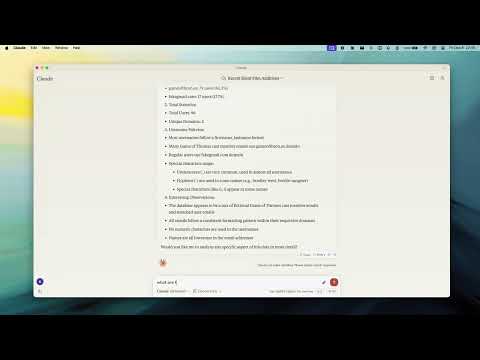
Why use it
- Talk to your database in plain language — the assistant discovers your collections and their shape automatically.
- Safe by default — turn on read-only mode to let an assistant explore without any risk of changing data.
- Works everywhere — connects to standalone, replica set, sharded, and Atlas deployments, over plain or TLS connections.
Key Features
- Read-Only Mode — blocks every write path (insert, update, index creation, and aggregation stages like `$out`/`$merge` that could modify data).
- Smart ObjectId Handling — configurable `auto`/`none`/`force` conversion of 24-character hex strings to ObjectIds.
- Schema Inference — automatic collection schema detection from document samples.
- Query & Aggregation — full query and aggregation pipeline support, with optional `explain` plans.
- Write Operations — insert, update, and index creation (when read-only mode is off).
- Time Conversion — a `convertTime` helper turns Unix timestamps and date strings into UTC/GMT/ISO, so date queries stay unambiguous across timezones.
- Progress & Cancellation — long operations report progress and can be cancelled mid-flight.
- Two Transports — run locally over stdio, or expose an HTTP endpoint for remote access.
Requirements
- Node.js 20 or newer
Quick Start
Point the server at your database — no install step needed:
npx -y mcp-mongo-server mongodb://localhost:27017/mydatabaseExplore safely, without any chance of changing data:
npx -y mcp-mongo-server mongodb://localhost:27017/mydatabase --read-onlyUsage
Local (stdio)
This is the default, used by Claude Desktop, Cursor, and other local clients:
npx -y mcp-mongo-server "mongodb://user:pass@localhost:27017/mydatabase"Remote (HTTP)
Expose an HTTP endpoint at `/mcp` for remote or multi-client access:
npx -y mcp-mongo-server "mongodb://user:pass@localhost:27017/mydatabase" --transport http --port 3001By default, only requests without a browser `Origin` (CLIs, IDEs) and requests
from `localhost` are accepted; everything else is rejected with `403` to guard
against DNS-rebinding attacks. Allow specific browser origins with
`--allowed-origins`:
npx -y mcp-mongo-server "mongodb://..." --transport http --port 3001 --allowed-origins "https://app.example.com"Options
| Flag | Description |
|---|---|
| `--read-only`, `-r` | Block all write operations |
| `--allow-cross-db` | Allow aggregation `$out`/`$merge`/`$lookup` to target other databases (off by default) |
| `--allow-server-js` | Allow server-side JavaScript operators `$function`/`$where`/`$accumulator` (off by default) |
| `--transport`, `-t` | `stdio` (default) or `http` |
| `--port`, `-p` | HTTP port (default `3001`) |
| `--allowed-origins` | Comma-separated browser origins to allow in HTTP mode |
| `--json-limit` | Max HTTP request body size (default `10mb`) |
| `--auth-token` | Require `Authorization: Bearer ` on the HTTP endpoint |
Environment Variables
| Variable | Description |
|---|---|
| `MCP_MONGODB_URI` | MongoDB connection URI (alternative to the argument) |
| `MCP_MONGODB_READONLY` | Enable read-only mode (`"true"`) |
| `MCP_MONGODB_ALLOW_CROSS_DB` | Allow cross-database aggregation stages (`"true"`) |
| `MCP_MONGODB_ALLOW_SERVER_JS` | Allow server-side JavaScript operators (`"true"`) |
| `MCP_PORT` | HTTP port |
| `MCP_HTTP_ALLOWED_ORIGINS` | Comma-separated browser origins to allow in HTTP mode |
| `MCP_HTTP_JSON_LIMIT` | Max HTTP request body size (default `10mb`) |
| `MCP_HTTP_AUTH_TOKEN` | Bearer token required to access the HTTP endpoint |
Security
Database scope. The server operates on the database in your connection
string. Aggregation stages that reach another database (`$out`, `$merge`,
`$lookup` with an explicit `db`) are rejected by default, so a pipeline can't
quietly read from or write to databases you didn't point it at. Enable them
with `--allow-cross-db` if you need them.
Server-side JavaScript. The aggregation operators `$function`, `$where`,
and `$accumulator` run arbitrary JavaScript on the MongoDB server. They are
rejected by default; enable them with `--allow-server-js` if you trust the
pipelines being run.
Read-only mode blocks every write path, including aggregation stages that
write or run server-side JavaScript (`$out`, `$merge`, `$function`, `$where`,
`$accumulator`).
Least privilege. Application-level checks only go so far — the strongest
guarantee comes from the database. Connect with a MongoDB user scoped to just
the database you need, with read-only permissions when the assistant only needs
to explore. That way the database itself enforces the boundary, as defense in
depth.
Documentation
- Integration Guide — Claude Desktop, Windsurf, Cursor, Docker
- Available Tools — query, aggregate, update, insert, and more
- Development — setup, scripts, and debugging
- Contributing
License
MIT — see LICENSE for details.
Frequently asked questions
What is mcp-mongo-server?
mcp-mongo-server is A Model Context Protocol Server for MongoDB TypeScript-based implementation.
How do I install mcp-mongo-server?
Open the GitHub repository and follow its README. Most MCP servers are added to your client's MCP config, then called by your agent.
Is mcp-mongo-server open source?
Yes — it is hosted on GitHub at https://github.com/kiliczsh/mcp-mongo-server and has 267 stars.
Related MCP tools
 memory-bank-mcp
A Model Context Protocol (MCP) server implementation for remote memory bank management, inspired by Cline Memory Bank. TypeScript-based implementation.
 apple-docs-mcp
MCP server for Apple Developer Documentation - Search iOS/macOS/SwiftUI/UIKit docs, WWDC videos, Swift/Objective-C APIs & code examples in Claude, Cursor & A...
 claude-debugs-for-you
Enable any LLM (e.g. Claude) to interactively debug any language for you via MCP and a VS Code Extension TypeScript-based implementation.
 mcp-server-azure-devops
An MCP server for Azure DevOps TypeScript-based implementation.
 git-mcp
Put an end to code hallucinations! GitMCP is a free, open-source, remote MCP server for any GitHub project TypeScript-based implementation.
 DevDocs
Completely free, private, UI based Tech Documentation MCP server. Designed for coders and software developers in mind. TypeScript-based implementation.
Run your own MCP server? See who uses it and what to fix.
Measure it with TrackMCP