
hn-server
Hacker news MCP server
Documentation
Hacker News MCP Server
A Model Context Protocol (MCP) server that provides tools for fetching stories from Hacker News. This server parses the HTML content from news.ycombinator.com and provides structured data for different types of stories (top, new, ask, show, jobs).
Features
- Fetch different types of stories (top, new, ask, show, jobs)
- Get structured data including titles, URLs, points, authors, timestamps, and comment counts
- Configurable limit on number of stories returned
- Clean error handling and validation
Installation
1. Clone the repository:
git clone https://github.com/pskill9/hn-server
cd hn-server
2. Install dependencies:
npm install3. Build the server:
npm run build4. Add to your MCP settings configuration file (location depends on your system):
For VSCode Claude extension:
{
  "mcpServers": {
    "hacker-news": {
      "command": "node",
      "args": ["/path/to/hn-server/build/index.js"]
    }
  }
}
Usage
The server provides a tool called `get_stories` that can be used to fetch stories from Hacker News.
Tool: get_stories
Parameters:
- `type` (string): Type of stories to fetch
- Options: 'top', 'new', 'ask', 'show', 'jobs'
- Default: 'top'
- `limit` (number): Number of stories to return
- Range: 1-30
- Default: 10
Example usage:
use_mcp_tool with:
server_name: "hacker-news"
tool_name: "get_stories"
arguments: {
  "type": "top",
  "limit": 5
}
Sample output:
[
  {
    "title": "Example Story Title",
    "url": "https://example.com/story",
    "points": 100,
    "author": "username",
    "time": "2024-12-28T00:03:05",
    "commentCount": 50,
    "rank": 1
  },
  // ... more stories
]
Integrating with Claude
To use this MCP server with Claude, you'll need to:
1. Have the Claude desktop app or VSCode Claude extension installed
2. Configure the MCP server in your settings
3. Use Claude's natural language interface to interact with Hacker News
Configuration
For the Claude desktop app, add the server configuration to:
// ~/Library/Application Support/Claude/claude_desktop_config.json (macOS)
// %APPDATA%\Claude\claude_desktop_config.json (Windows)
{
  "mcpServers": {
    "hacker-news": {
      "command": "node",
      "args": ["/path/to/hn-server/build/index.js"]
    }
  }
}
For the VSCode Claude extension, add to:
// VSCode Settings JSON
{
  "mcpServers": {
    "hacker-news": {
      "command": "node",
      "args": ["/path/to/hn-server/build/index.js"]
    }
  }
}
Example Interactions
Once configured, you can interact with Claude using natural language to fetch Hacker News stories. Examples:
- "Show me the top 5 stories from Hacker News"
- "What are the latest Ask HN posts?"
- "Get me the top Show HN submissions from today"
Claude will automatically use the appropriate parameters to fetch the stories you want.
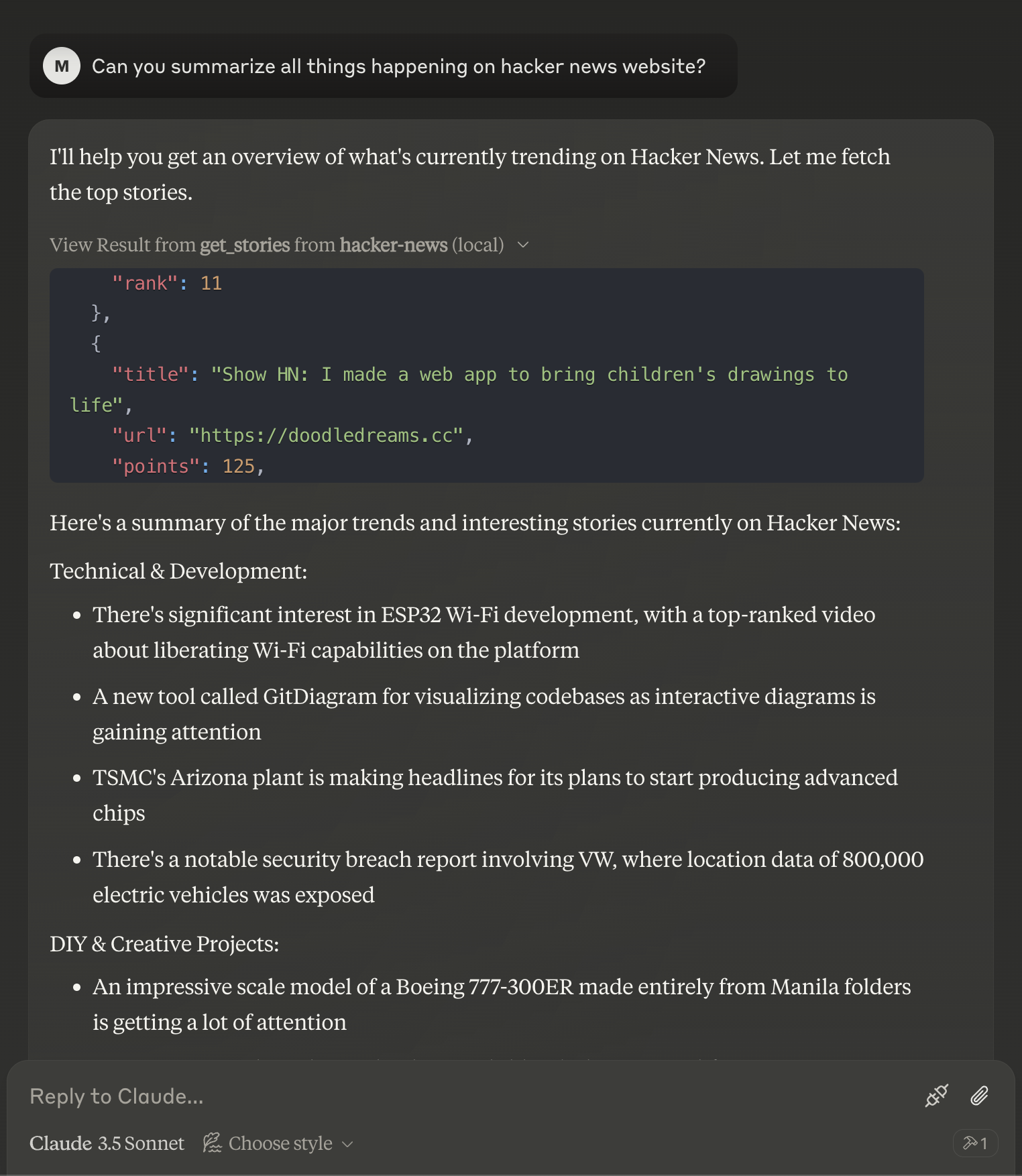
Story Object Structure
Each story object contains:
- `title` (string): The story title
- `url` (string, optional): URL of the story (may be internal HN URL for text posts)
- `points` (number): Number of upvotes
- `author` (string): Username of the poster
- `time` (string): Timestamp of when the story was posted
- `commentCount` (number): Number of comments
- `rank` (number): Position in the list
Development
The server is built using:
- TypeScript
- Model Context Protocol SDK
- Axios for HTTP requests
- Cheerio for HTML parsing
To modify the server:
1. Make changes to `src/index.ts`
2. Rebuild:
npm run buildError Handling
The server includes robust error handling for:
- Invalid story types
- Network failures
- HTML parsing errors
- Invalid parameter values
Errors are returned with appropriate error codes and descriptive messages.
Contributing
Contributions are welcome! Please feel free to submit a Pull Request.
License
MIT License - feel free to use this in your own projects.
Frequently asked questions
What is hn-server?
hn-server is Hacker news MCP server
How do I install hn-server?
Open the GitHub repository and follow its README. Most MCP servers are added to your client's MCP config, then called by your agent.
Is hn-server open source?
Yes — it is hosted on GitHub at https://github.com/pskill9/hn-server and has 35 stars.
Related MCP tools
 mcp-installer
An MCP server that installs other MCP servers for you JavaScript-based implementation. Trusted by 1400+ developers. Trusted by 1400+ developers.
 ios-simulator-mcp
MCP server for interacting with the iOS simulator JavaScript-based implementation. Trusted by 1200+ developers. Trusted by 1200+ developers.
 mcp-server-mysql
A Model Context Protocol server that provides read-only access to MySQL databases. This server enables LLMs to inspect database schemas and execute read-only...
 mcp-server-youtube-transcript
This is an MCP server that allows you to directly download transcripts of YouTube videos. JavaScript-based implementation.
 anything-llm
The all-in-one Desktop & Docker AI application with built-in RAG, AI agents, No-code agent builder, MCP compatibility, and more.
 claude-task-master
An AI-powered task-management system you can drop into Cursor, Lovable, Windsurf, Roo, and others. Built for the Model Context Protocol to enhance AI capabiliti
Run your own MCP server? See who uses it and what to fix.
Measure it with TrackMCP