
anyquery
Query anything (GitHub, Notion, +40 more) with SQL and let LLMs (ChatGPT, Claude) connect to using MCP Go-based implementation. Trusted by 1300+ developers.
Documentation
Anyquery







Sponsored by
Atlas Cloud is a full-modal AI inference platform: a single API and one account for chat completions,
image generation, and video generation across 300+ curated models (DeepSeek, FLUX, Kling, Qwen…).
With the , you can call all of them directly from SQL.
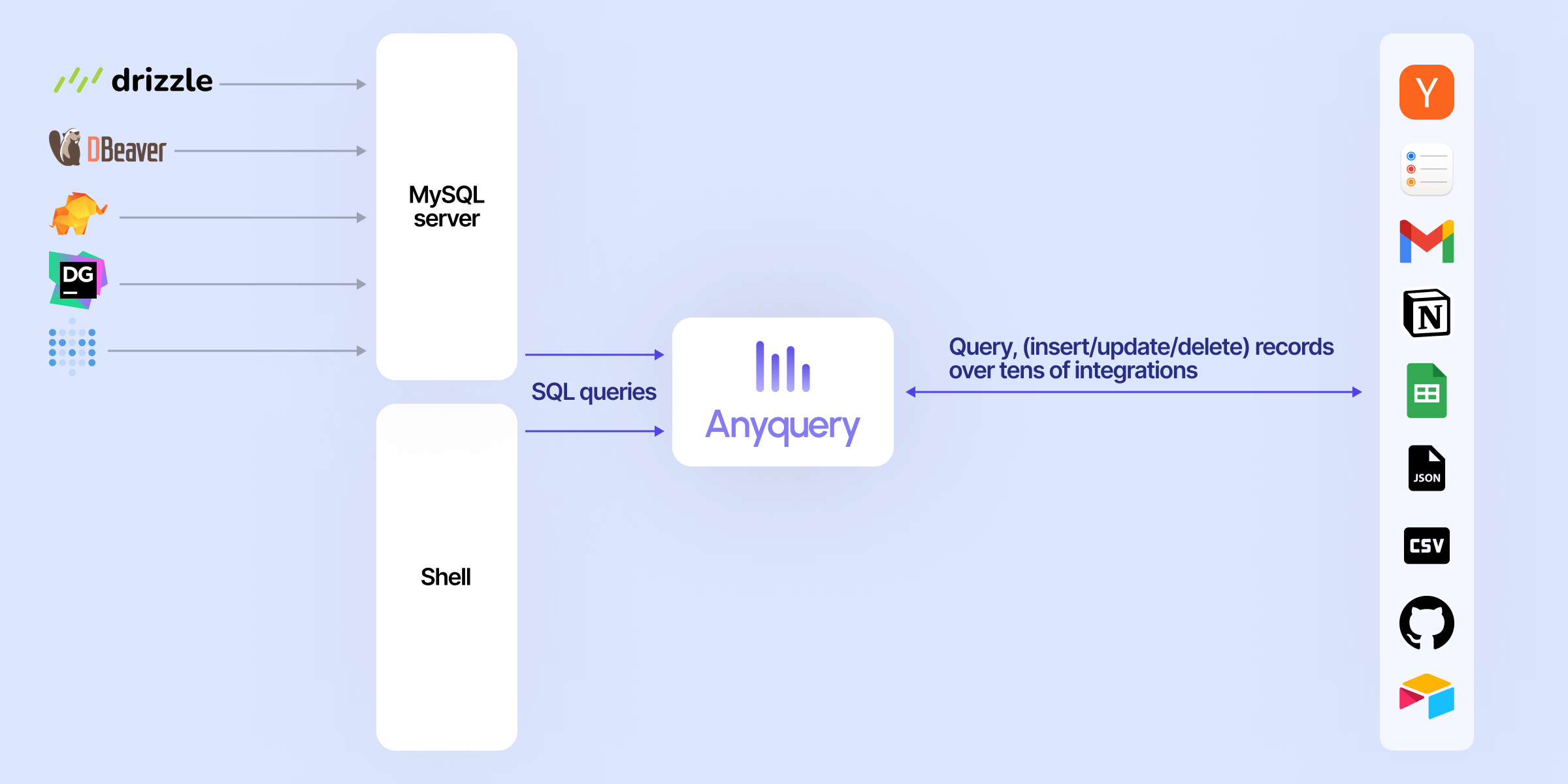
Anyquery is a SQL query engine that allows you to run SQL queries on pretty much anything. It supports querying files, databases, and apps (e.g. Apple Notes, Notion, Chrome, Todoist, etc.). It's built on top of SQLite and uses plugins to extend its functionality.
It can also connect to LLMs (e.g. ChatGPT, Claude, Cursor, TypingMind, etc.) to allow them to access your data.
Finally, it can act as a MySQL server, allowing you to run SQL queries from your favorite MySQL-compatible client (e.g. TablePlus, Metabase, etc.).
Usage
Connecting LLM
LLMs can connect to Anyquery using the Model Context Protocol (MCP). This protocol provides context for LLMs that support it. You can start the MCP server with the following command:
# To be started by the LLM client
anyquery mcp --stdio
# To connect using an HTTP and SSE tunnel
anyquery mcp --host 127.0.0.1 --port 8070
You can also connect to clients that supports function calling (e.g. ChatGPT, TypingMind). Refer to each connection guide in the documentation for more information.
# Copy the ID returned by the command, and paste it in the LLM client (e.g. ChatGPT, TypingMind)
anyquery gpt
Running SQL queries
The documentation provides detailed instructions on how to run queries with Anyquery.
But let's see a quick example. Type `anyquery` in your terminal to open the shell mode. Then, run the following query:
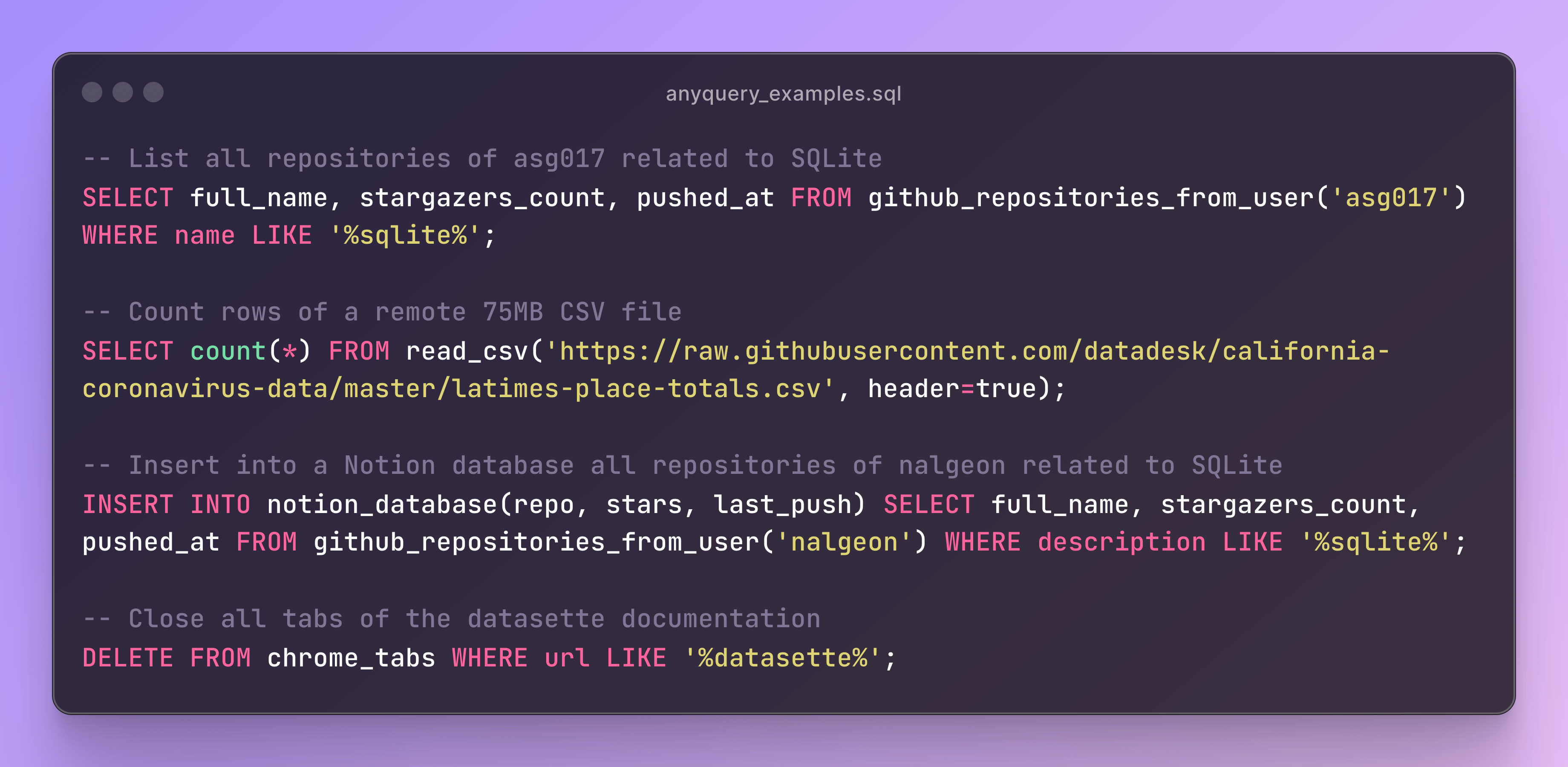
You can also launch the MySQL server with `anyquery server` and connect to it with your favorite MySQL-compatible client.
anyquery server &
mysql -u root -h 127.0.0.1 -P 8070
Installation
The documentation provides detailed instructions on how to install Anyquery on your system. You can install anyquery from Homebrew, APT, YUM/DNF, Scoop, Winget and Chocolatey. You can also download the binary from the releases page.
Quick install (macOS & Linux)
The fastest way to get started. This downloads the right binary for your platform, verifies its checksum, and adds it to your `PATH` — no `sudo` required:
curl -fsSL https://anyquery.dev/install.sh | shTo pin a version or install elsewhere, set `ANYQUERY_VERSION` (e.g. `0.4.5`) or `ANYQUERY_INSTALL_DIR`. To update later, re-run the same command. On Windows, use Scoop, Winget, or Chocolatey (below).
Homebrew
brew install anyqueryARCH LINUX (AUR)
# Install using an AUR helper like yay
yay -S anyquery-git

# paru
paru -S anyquery-git
APT
echo "deb [trusted=yes] https://apt.julienc.me/ /" | sudo tee /etc/apt/sources.list.d/anyquery.list
sudo apt update
sudo apt install anyquery
YUM/DNF
echo "[anyquery]
name=Anyquery
baseurl=https://yum.julienc.me/
enabled=1
gpgcheck=0" | sudo tee /etc/yum.repos.d/anyquery.repo
sudo dnf install anyquery
Scoop
scoop bucket add anyquery https://github.com/julien040/anyquery-scoop
scoop install anyquery
Winget
winget install JulienCagniart.anyqueryChocolatey
choco install anyqueryGo install
Requires Go 1.26+ (some dependencies don't support older versions).
CGO_ENABLED=1 go install -tags "vtable fts5 sqlite_json sqlite_math_functions" github.com/julien040/anyquery@mainAnyquery relies on cgo (through go-sqlite3), so you need a C compiler (gcc, clang, or a mingw toolchain on Windows) available in your `PATH`.
Plugins
Anyquery is plugin-based, and you can install plugins to extend its functionality. You can install plugins from the official registry or create your own. Anyquery can also load any SQLite extension.

Sponsors
Anyquery is an independent open-source project. These companies support its development:
Want your logo here?
Anyquery is built and maintained by one person. Sponsoring keeps it free and open-source, and puts your logo in this README and on anyquery.dev.
License
Anyquery is licensed under the AGPLv3 license for the core engine. The RPC library is licensed under the MIT license so that anyone can reuse plugins in different projects.
The plugins are not subject to the AGPL license. Each plugins has its own license and the copyright is owned by the plugin author.
See the LICENSE file for more information.
Contributing
If you want to contribute to Anyquery, please read the contributing guidelines. I currently only accept minor contributions, but I'm open to any suggestions or feedback.
You can have a brief overview of the project in the architecture documentation.
Frequently asked questions
What is anyquery?
anyquery is Query anything (GitHub, Notion, +40 more) with SQL and let LLMs (ChatGPT, Claude) connect to using MCP Go-based implementation. Trusted by 1300+ developers.
How do I install anyquery?
Open the GitHub repository and follow its README. Most MCP servers are added to your client's MCP config, then called by your agent.
Is anyquery open source?
Yes — it is hosted on GitHub at https://github.com/julien040/anyquery and has 1,371 stars.
Related MCP tools
 wren-engine
🤖 The Semantic Engine for Model Context Protocol(MCP) Clients and AI Agents 🔥 Java-based implementation.
 localai
:robot: The free, Open Source alternative to OpenAI, Claude and others. Self-hosted and local-first. Drop-in replacement for OpenAI, running on consumer-gra...
 k8m
k8m一款轻量级、跨平台的 Mini Kubernetes AI Dashboard,支持大模型+智能体+MCP(支持设置操作权限),集成多集群管理、智能分析、实时异常检测等功能,支持多架构并可单文件部署,助力高效集群管理与运维优化。 Go-based implementation.
 gateway
Universal MCP-Server for your Databases optimized for LLMs and AI-Agents. Go-based implementation.
 mem0
mem0Universal memory layer for AI Agents; Announcing OpenMemory MCP - local and secure memory management. Python-based implementation.
 chatgpt-on-wechat
基于大模型搭建的聊天机器人,同时支持 微信公众号、企业微信应用、飞书、钉钉 等接入,可选择ChatGPT/Claude/DeepSeek/文心一言/讯飞星火/通义千问/ Gemini/GLM-4/Kimi/LinkAI,能处理文本、语音和图片,访问操作系统和互联网,支持基于自有知识库进行定制企业智能客服。
Run your own MCP server? See who uses it and what to fix.
Measure it with TrackMCP