
MCP-Storybook-Image-Generator
Documentation
MCP Storybook Image Generator
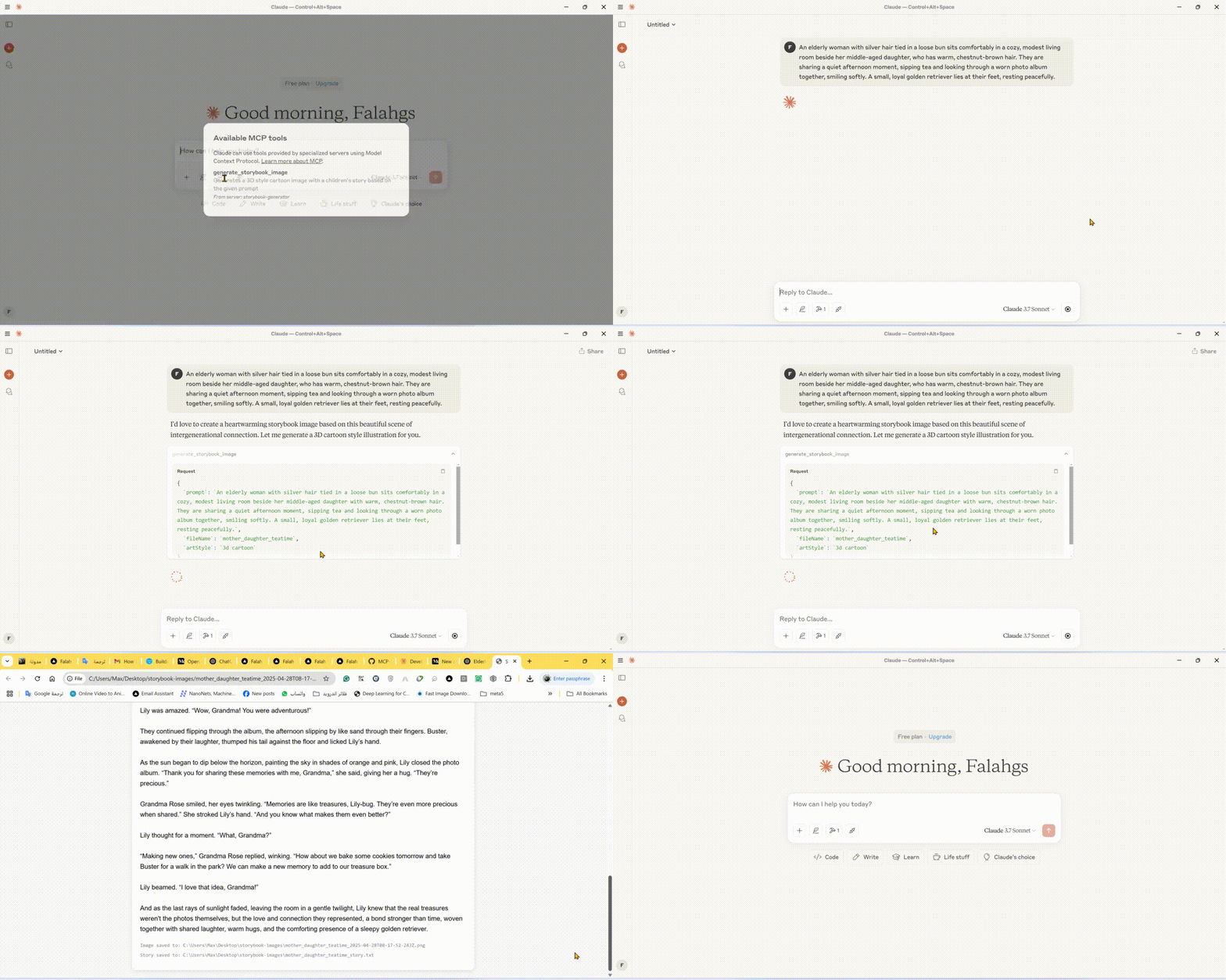
A professional-grade server that generates beautiful storybook images with matching children's stories using Google's Gemini AI.
🎬 Demo
🌟 Features
- Storybook Image Generation: Creates high-quality images in various art styles for children's stories
- Automatic Story Creation: Generates engaging children's stories to match the images
- Multiple Art Styles: Choose from 3D cartoon, watercolor, pixel art, hand drawn, or claymation styles
- Instant Preview: Automatically opens generated images and stories in your browser
- Local Storage: Saves images and stories in an organized output directory
🛠️ Technical Stack
- Core Framework: Model Context Protocol (MCP) SDK
- AI Integration: Google Generative AI (Gemini)
- Runtime: Node.js v14+
- Language: TypeScript
- Package Manager: npm
📋 Prerequisites
- Node.js (v14 or higher)
- Google Gemini API key
- TypeScript
⚙️ Installation
1. Install dependencies:
npm install3. Configure environment:
Create a `.env` file in the root directory:
GEMINI_API_KEY=your_api_key_here4. Build the project:
npm run build🚀 Using the CLI
You can use the storybook generator directly from the command line:
# Using npx (after publishing to npm)
npx mcp-storybook-image-generator --api-key your_api_key_here --save-to-desktop

# Or run locally
node build/cli.js --api-key your_api_key_here --save-to-desktop
Command Line Options
| Option | Description |
|---|---|
| `--api-key ` | Set your Gemini API key |
| `--save-to-desktop` | Save generated files to desktop |
| `--debug` | Enable debug logging |
| `--help` | Show help information |
🔧 Configuring Claude Desktop with MCP Server
To integrate this server with Claude Desktop:
1. Locate the Claude Desktop Configuration File:
2. Add the following configuration:
{
  "mcpServers": {
    "storybook-generator": {
      "command": "npx",
      "args": [
        "-y",
        "mcp-storybook-image-generator@latest",
        "--api-key",
        "your_gemini_api_key_here"
      ],
      "env": {
        "SAVE_TO_DESKTOP": "true",
        "DEBUG": "false"
      }
    }
  }
}
🚀 Available Tool
Storybook Image Generator Tool
{
  "name": "generate_storybook_image",
  "description": "Generates a 3D style cartoon image with a children's story based on the given prompt",
  "inputSchema": {
    "type": "object",
    "properties": {
      "prompt": {
        "type": "string",
        "description": "The prompt describing the storybook scene to generate"
      },
      "fileName": {
        "type": "string",
        "description": "Base name for the output files (without extension)"
      },
      "artStyle": {
        "type": "string",
        "description": "The art style for the image (default: '3d cartoon')",
        "enum": ["3d cartoon", "watercolor", "pixel art", "hand drawn", "claymation"]
      }
    },
    "required": ["prompt", "fileName"]
  }
}
📄 Example Usage
Storybook Generation Examples
// Generate a storybook with a 3D cartoon style
{
  "name": "generate_storybook_image",
  "arguments": {
    "prompt": "A friendly dragon teaching kids how to fly",
    "fileName": "dragon_flight_lesson",
    "artStyle": "3d cartoon"
  }
}

// Generate a storybook with a watercolor style
{
  "name": "generate_storybook_image",
  "arguments": {
    "prompt": "A rabbit and turtle having a tea party in the forest",
    "fileName": "forest_tea_party",
    "artStyle": "watercolor"
  }
}

// Generate a storybook with pixel art style
{
  "name": "generate_storybook_image",
  "arguments": {
    "prompt": "A space adventure with a kid astronaut meeting friendly aliens",
    "fileName": "space_adventure",
    "artStyle": "pixel art"
  }
}
⚙️ Configuration Options
Environment Variables
| Variable | Description | Default |
|---|---|---|
| `GEMINI_API_KEY` | Google Gemini API key for AI generation | (Required) |
| `SAVE_TO_DESKTOP` | Force saving to desktop directory | false |
| `DEBUG` | Enable verbose debug logging | false |
📝 Output Files
For each storybook generation request, the server produces:
1. PNG Image: The generated illustration matching your prompt in the requested art style
2. Text File: The matching children's story in plain text format
3. HTML Preview: A combined view showing both the image and story together
These files are saved to either:
- Your desktop in a folder called "storybook-images" (if `SAVE_TO_DESKTOP=true`)
- The server's directory in a folder called "storybook-images"
🤝 Contributing
Contributions, issues, and feature requests are welcome! Feel free to check issues page.
📄 License
This project is licensed under the MIT License - see the LICENSE file for details.
Frequently asked questions
What is MCP-Storybook-Image-Generator?
MCP-Storybook-Image-Generator is a Model Context Protocol (MCP) server listed in the TrackMCP directory.
How do I install MCP-Storybook-Image-Generator?
Open the GitHub repository and follow its README. Most MCP servers are added to your client's MCP config, then called by your agent.
Is MCP-Storybook-Image-Generator open source?
Yes — it is hosted on GitHub at https://github.com/falahgs/MCP-Storybook-Image-Generator and has 3 stars.
Related MCP tools
 mcp-remote
Connect an MCP Client that only supports local (stdio) servers to a Remote MCP Server, with auth support: TypeScript-based implementation.
 mcp-get
- Discover available MCP servers from our curated registry TypeScript-based implementation.
 cherry-studio
🍒 Cherry Studio is a desktop client that supports for multiple LLM providers. Built for the Model Context Protocol to enhance AI capabilities.
 librechat
Enhanced ChatGPT Clone: Features Agents, MCP, DeepSeek, Anthropic, AWS, OpenAI, Responses API, Azure, Groq, o1, GPT-5, Mistral, OpenRouter, Vertex AI, Gemini...
 fastgpt
FastGPT is a knowledge-based platform built on the LLMs, offers a comprehensive suite of out-of-the-box capabilities such as data processing, RAG retrieval, ...
 composio
Composio equips your AI agents & LLMs with 100+ high-quality integrations via function calling for the Model Context Protocol. Enhance AI assistants with powerf
Run your own MCP server? See who uses it and what to fix.
Measure it with TrackMCP