
CAD-MCP
CAD MCP Server Python-based implementation.
Documentation
CAD-MCP Server (CAD Model Context Protocol Server)
Project Introduction
CAD-MCP is an innovative CAD control service that allows controlling CAD software for drawing operations through natural language instructions. This project combines natural language processing and CAD automation technology, enabling users to create and modify CAD drawings through simple text commands without manually operating the CAD interface.
Features
CAD Control Functions
- Multiple CAD Software Support: Supports mainstream CAD software including AutoCAD, GstarCAD (GCAD) and ZWCAD
- Basic Drawing Functions:
- Line drawing
- Circle drawing
- Arc drawing
- Rectangle drawing
- Polyline drawing
- Text addition
- Pattern filling
- Dimension annotation
- Layer Management: Create and switch layers
- Drawing Save: Save the current drawing as a DWG file
Natural Language Processing Functions
- Command Parsing: Parse natural language instructions into CAD operation parameters
- Color Recognition: Extract color information from text and apply it to drawing objects
- Shape Keyword Mapping: Support recognition of various shape description words
- Action Keyword Mapping: Recognize various drawing and editing actions
Demo
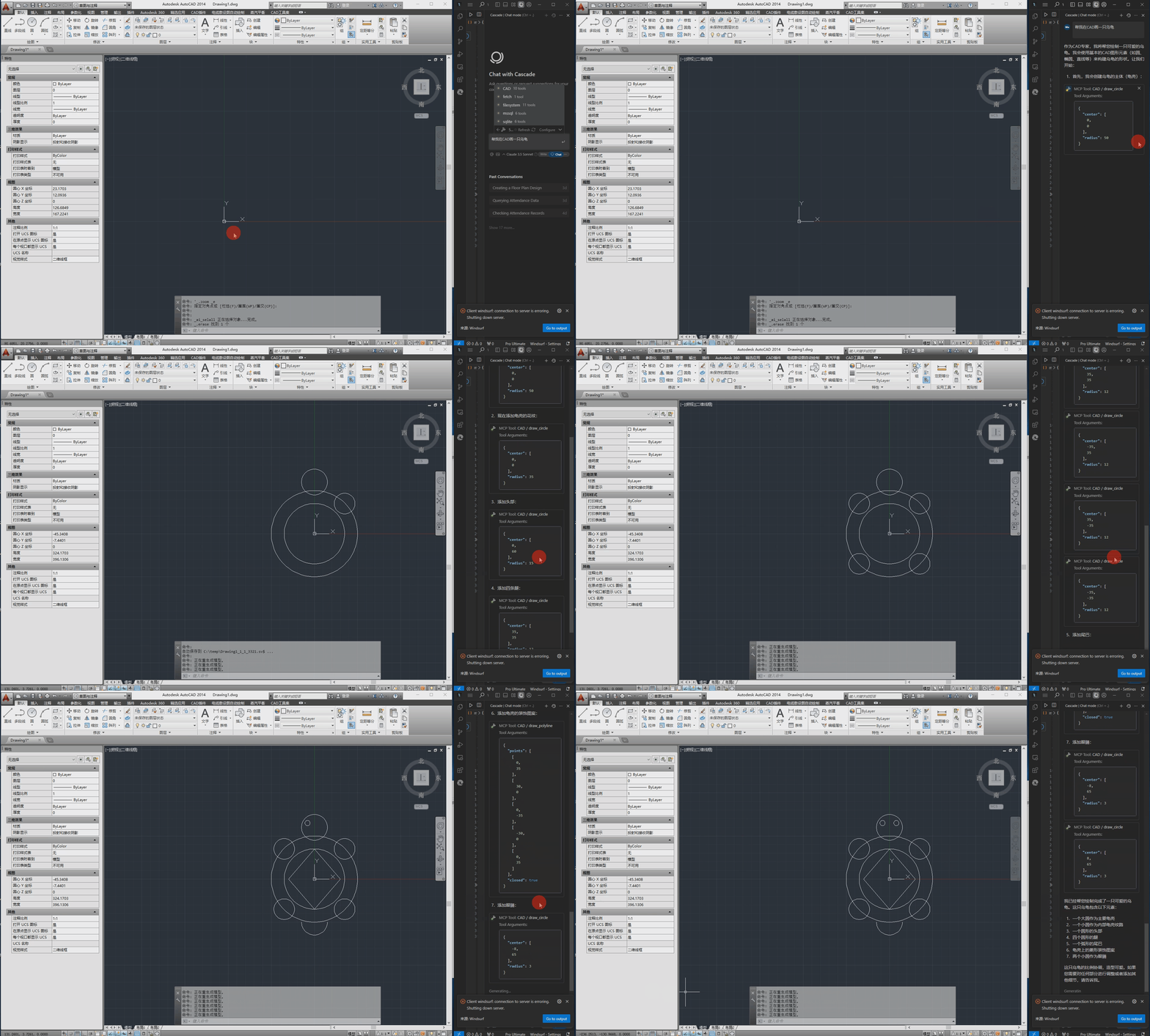
The following is the demo video.
Installation Requirements
Dependencies
pywin32>=228    # Windows COM interface support
mcp>=0.1.0      # Model Control Protocol library
pydantic>=2.0.0 # Data validation
typing>=3.7.4.3 # Type annotation support
System Requirements
- Windows operating system
- Installed CAD software (AutoCAD, GstarCAD, or ZWCAD)
Configuration
The configuration file is located at `src/config.json` and contains the following main settings:
{
    "server": {
        "name": "CAD MCP Server",
        "version": "1.0.0"
    },
    "cad": {
        "type": "AutoCAD",
        "startup_wait_time": 20,
        "command_delay": 0.5
    },
    "output": {
        "directory": "./output",
        "default_filename": "cad_drawing.dwg"
    }
}- server: Server name and version information
- cad:
- `type`: CAD software type (AutoCAD, GCAD, GstarCAD, or ZWCAD)
- `startup_wait_time`: CAD startup waiting time (seconds)
- `command_delay`: Command execution delay (seconds)
- output: Output file settings
Usage
Starting the Service
python src/server.pyClaude Desktop & Windsurf
# add to claude_desktop_config.json. Note: use your path
{
    "mcpServers": {
        "CAD": {
            "command": "python",
            "args": [
                # your path, e.g.: "C:\\cad-mcp\\src\\server.py"
                "~/server.py"
            ]
        }
    }
}
Cursor
# Add according to the following diagram Cursor MCP. Note: use your path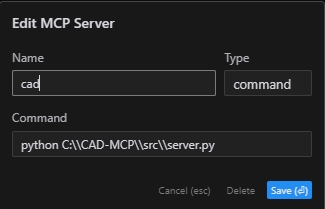
Note:The new version of cursor has also been changed to JSON configuration, please refer to the previous section
MCP Inspector
# Note: use your path
npx -y @modelcontextprotocol/inspector python C:\\cad-mcp\\src\\server.py
Service API
The server provides the following main API functions:
- `draw_line`: Draw a line
- `draw_circle`: Draw a circle
- `draw_arc`: Draw an arc
- `draw_polyline`: Draw a polyline
- `draw_rectangle`: Draw a rectangle
- `draw_text`: Add text
- `draw_hatch`: Draw a hatch pattern
- `add_dimension`: Add linear dimension
- `save_drawing`: Save the drawing
- `process_command`: Process natural language commands
Project Structure
CAD-MCP/
├── imgs/                # Images and video resources
│   └── CAD-mcp.mp4     # Demo video
├── requirements.txt     # Project dependencies
└── src/                 # Source code
    ├── __init__.py     # Package initialization
    ├── cad_controller.py # CAD controller
    ├── config.json     # Configuration file
    ├── nlp_processor.py # Natural language processor
    └── server.py       # Server implementation
License
MIT License
Frequently asked questions
What is CAD-MCP?
CAD-MCP is CAD MCP Server Python-based implementation.
How do I install CAD-MCP?
Open the GitHub repository and follow its README. Most MCP servers are added to your client's MCP config, then called by your agent.
Is CAD-MCP open source?
Yes — it is hosted on GitHub at https://github.com/daobataotie/CAD-MCP and has 186 stars.
Related MCP tools
 mcp-client-for-ollama
A text-based user interface (TUI) client for interacting with MCP servers using Ollama. Features include multi-server, dynamic model switching, streaming res...
 biomcp
Biomedical Model Context Protocol Python-based implementation.
 mcp-agent
Build effective agents using Model Context Protocol and simple workflow patterns Python-based implementation. Trusted by 7600+ developers.
 minima
On-premises conversational RAG with configurable containers for the Model Context Protocol. Enhance AI assistants with powerful integrations.
 mcp-bridge
A middleware to provide an openAI compatible endpoint that can call MCP tools Python-based implementation. Trusted by 800+ developers.
 mcp-google-ads
An MCP tool that connects Google Ads with Claude AI/Cursor and others, allowing you to analyze your advertising data through natural language conversations.
Run your own MCP server? See who uses it and what to fix.
Measure it with TrackMCP